


Gorgias Pricing Explained: What It Actually Costs in 2026
Quick Summary
Gorgias pricing looks simple until overages, AI add-ons, and feature gates inflate your bill. This guide breaks down every tier, where the hidden costs live, how overage charges work when you exceed ticket limits, and how ticket-based pricing compares to Rep AI's session-based model.
Is Gorgias Worth the Price Tag?
Gorgias is one of the most popular helpdesk platforms for Shopify and e-commerce brands. It centralizes customer conversations, automates repetitive queries, and gives support teams instant access to order data without leaving the ticket. On paper, it checks the boxes.
But the pricing model tells a different story. Ticket-based billing means your costs rise as your business grows—more orders, more inquiries, higher invoices. Add in AI agent fees charged per resolved conversation, feature gates that force tier upgrades, and overage charges during peak seasons, and the actual cost becomes difficult to predict. This guide breaks down what you'll really pay.
Why Listen to Us?
At Rep AI, we're the first Agentic Commerce OS built for Shopify brands, combining sales, support, and shopper intelligence in one platform. We work alongside helpdesks like Gorgias daily, so we've seen exactly where ticket-based pricing breaks down and what it actually costs at scale.

Gorgias Pricing Breakdown
Understanding Gorgias pricing means looking beyond the advertised base costs. Your actual bill depends on ticket volume, AI automation usage, and which features you need access to.
All tiers include omnichannel support across email, live chat, social media, WhatsApp, and SMS, plus access to 150+ integrations. However, voice support is a separate add-on regardless of tier, and revenue analytics are locked behind Pro and above.
Starter ($10–$60/month)
The entry point for very small stores is just getting started with structured support.
- Included tickets: 50/month
- Overage cost: $0.40 per additional ticket
- AI Agent: $1.00 per resolved conversation (monthly billing only—no yearly option)
- Automated interactions included: 0–50
At 50 tickets, this tier works for stores with minimal support volume. But exceed that limit even slightly—say, 80 tickets in a busy month—and you're paying $12 extra in overages alone. Add 30 AI resolutions at $1.00 each, and your $10 plan is now $52.
Basic ($50–$210/month)
Designed for growing stores with moderate support volume and early interest in AI automation.
- Included tickets: 300/month
- Overage cost: $0.40 per additional ticket
- AI Agent: $1.00 per resolved conversation (monthly) or $0.90 (yearly)
- Automated interactions included: 0–150
The jump from Starter to Basic gets you 6x the ticket capacity, but the overage rate stays the same. If you're consistently hitting 400–500 tickets, you're looking at $40–$80 in overages monthly. And that’s not including AI costs.
Pro ($300–$1,360/month)
Where most scaling Shopify brands land. Pro unlocks revenue analytics and supports higher automation volume.
- Included tickets: 2,000/month
- Overage cost: $0.36 per additional ticket
- AI Agent: $1.00 per resolved conversation (monthly) or $0.90 (yearly)
- Automated interactions included: 0–1,000
The overage rate drops slightly to $0.36, but the real cost driver here is AI. If you're using AI to resolve 1,500 conversations monthly (500 over the included limit), that's an extra $450–$500 on top of your base price.
Advanced ($750–$3,400/month)
Built for large Shopify stores running high-volume, multi-channel support operations.
- Included tickets: 5,000/month
- Overage cost: $0.36 per additional ticket
- AI Agent: $1.00 per resolved conversation (monthly) or $0.90 (yearly)
- Automated interactions included: 0–2,500
At this tier, you're paying for capacity. But the AI pricing model remains the same; every resolved conversation beyond your included limit costs $0.90–$1.00. For brands leaning heavily on automation, AI fees can rival the base subscription.
Enterprise (Custom Pricing)
For merchants with 5,000+ tickets monthly and complex requirements.
- Included tickets: 5,000+
- Overage cost: $0.32 per additional ticket
- AI Agent: $0.90–$1.00 per resolved conversation
- Automated interactions: No hard cap
Enterprise pricing is negotiated, but the structure remains ticket-based with per-conversation AI fees. The overage rate is the lowest at $0.32, though at this volume, even small overages add up quickly.
Pricing Summary Table
| # | Tier | Base Price | Included Tickets | AI Agent Cost | Overage (per Ticket) |
|---|---|---|---|---|---|
| 1 | Starter | $10–$60 | 50 | $1.00 | $0.40 |
| 2 | Basic | $50–$210 | 300 | $0.90–$1.00 | $0.40 |
| 3 | Pro | $300–$1,360 | 2,000 | $0.90–$1.00 | $0.36 |
| 4 | Advanced | $750–$3,400 | 5,000 | $0.90–$1.00 | $0.36 |
| 5 | Enterprise | Custom | 5,000+ | $0.90–$1.00 | $0.32 |
How Overages Actually Work
Overages are where Gorgias’ pricing gets unpredictable. Your base plan includes a fixed number of tickets. Exceed that number, and every additional ticket costs $0.32–$0.40, depending on your tier.
Consider this scenario: A store on the Pro plan pays $300/month for 2,000 tickets. During Black Friday week, support volume spikes to 2,800 tickets. That's 800 extra tickets at $0.36 each ($288 in overages). If they also used AI to resolve 1,500 conversations (500 beyond the included 1,000), that's another $450 at $0.90 each.
The total bill ends up at $1,038 instead of $300. A 246% increase during your highest-revenue period.
What you’ll notice is that overages hit hardest when your business is performing best. More sales mean more customer inquiries and more "where is my order" tickets. Ticket-based pricing turns peak performance into peak cost.
The Hidden Costs of Using Gorgias
Beyond base pricing and overages, several factors inflate your total Gorgias investment:
- AI Is Always an Add-On: Even at Enterprise, AI capabilities aren't bundled. You pay $0.90–$1.00 for every conversation the AI resolves. The better your automation performs, the higher your bill climbs.
- Feature Gates Force Upgrades: If you need revenue analytics, you must subscribe to the Pro plan at a minimum. Want voice support? That’s a separate add-on. Many brands upgrade tiers not because they need more tickets, but because a single feature is locked behind a higher plan.
- Manual Maintenance Is Required: Gorgias doesn't sync your catalog automatically. When you add products, update descriptions, or change pricing, you need to manually resync. Product exclusions require adding tags in Shopify.
- Attribution Inflates AI Value: Gorgias uses a 3-day attribution window for AI-influenced sales. A customer could chat on Monday, browse competitors for two days, then buy on Thursday—and Gorgias credits the AI. This makes e-commerce ROI calculations look better than reality.
What Gorgias Users Say About Pricing
Beyond the published rates, user reviews reveal specific frustrations that don't show up on the pricing page:
1. AI Costs Add Up Faster Than Expected
Even users who like the platform note that AI agent fees create unpredictable bills. One G2 reviewer put it directly: "It's a bit too expensive. I would like it to be more affordable or offer AI services at an integrated cost."
2. New Features Arrive as Paid Add-Ons
Several users report that capabilities they assumed would be included, or that were previously bundled, now require separate purchases. The platform evolves, but each evolution comes as a paid add-on.
3. Pricing Increases While Support Quality Declines
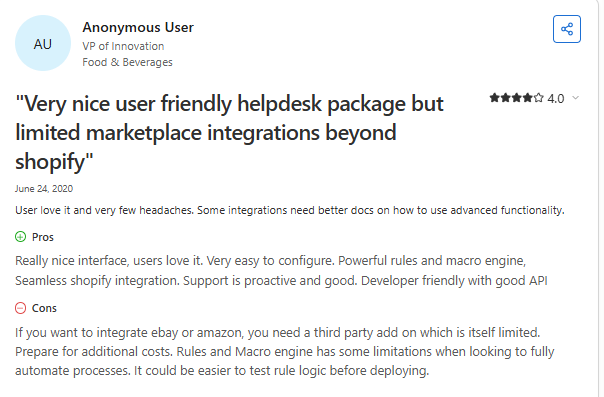
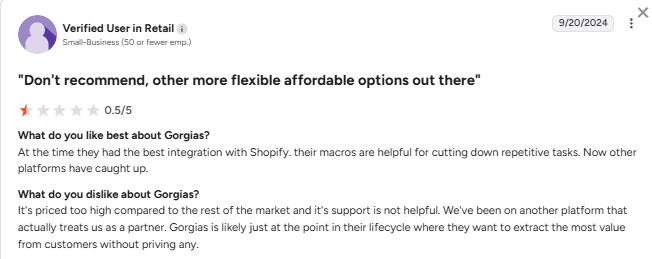
Multiple reviewers mention that costs have risen over time, while responsiveness from Gorgias support has dropped. You're paying more but getting less help when you need it.
4. Tier Upgrades Feel Forced
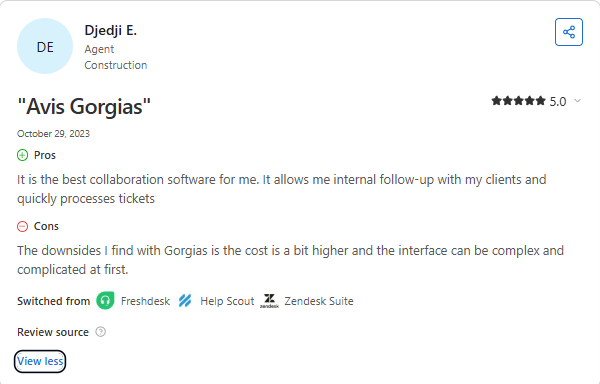
Users consistently mention needing to jump to higher tiers—not because they've outgrown their ticket limits, but because a single feature they need is locked behind the next plan.
Rep AI Pricing: How Session-Based Works
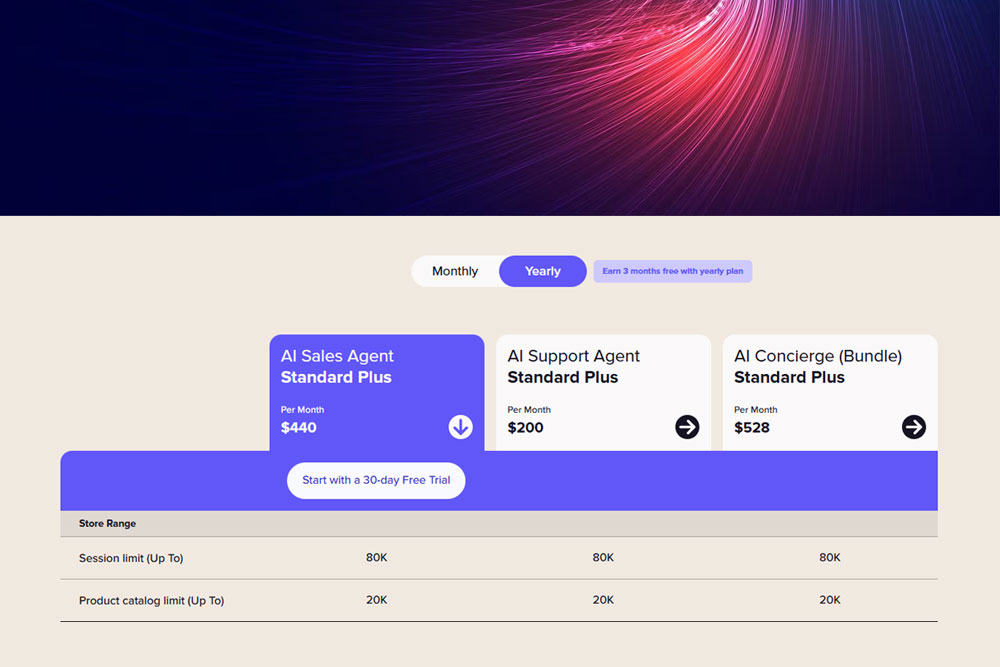
Rep AI takes a fundamentally different approach. Instead of charging per ticket (support burden), we charge per session (revenue opportunity). Your cost scales with website traffic, i.e., the visitors who could become customers, not with how many support requests you handle.
Pricing Tiers
- Pay As You Grow (0–3K sessions): $12 per 1,000 visitors
- Basic (25K sessions): $159–$191/month
- Standard (50K sessions): $280–$336/month
- Pro Plus (180K sessions): $792–$952/month
- Advanced Plus (500K sessions): $1,912–$2,296/month
- Enterprise (500K+): Custom pricing
What's Included at Every Tier
- Behavioral AI Sales Agent for proactive engagement, not just reactive support
- AI Support Agent handles WISMO, returns, cancellations, FAQs
- Shopper Intelligence on drop-off analytics, unanswered questions, missing site info
- Unlimited team members; no per-seat fees
- Real-time catalog sync without manual maintenance
- 30-day free trial with 5X ROI guarantee
On your website traffic, there are no per-conversation fees — Website Concierge is priced on sessions, not per resolution, so your AI cost doesn’t scale with ticket volume. (If you also run Omni-Channel AI across email, chat, and social, that’s priced separately at $0.50–$0.75 per resolution depending on your plan (lower on annual, higher on monthly) — still less than Gorgias’s $0.90–$1.00.) Every Website Concierge tier includes the same AI capabilities — tiers differ only by session capacity. (Omni-Channel AI, Rep Inbox, and Deep Research are separate products, priced separately.)
Gorgias vs Rep AI: Side-By-Side
| # | Factor | Gorgias | Rep AI |
|---|---|---|---|
| 1 | Pricing Model | Per ticket + AI add-on | Per session (all-inclusive) |
| 2 | AI Costs (Website Concierge) | $0.90–$1.00/resolved conversation | Included in session pricing |
| 3 | AI Costs (Omni-Channel AI, if used) | $0.90–$1.00/resolved conversation | $0.50–$0.75/resolution (annual–monthly) |
| 4 | Catalog Sync | Manual resyncing required | Real-time, automatic |
| 5 | Proactive Engagement | None; reactive only | Behavioral triggers, exit intent detection |
| 6 | Product Display | Text lists, opens new tabs | Visual carousels, one-click add to cart |
| 7 | Focus | Support deflection | Sales conversion + support |
Cost Comparison: 50K sessions, ~500 tickets/month
- Gorgias (Basic + 300 AI resolutions): ~$480/month
- Rep AI (Standard): $336/month
Cost Comparison: 180K sessions, ~2,000 tickets/month
- Gorgias (Pro + 1,500 AI resolutions): ~$1,020/month
- Rep AI (Pro Plus): $952/month, with proactive sales features included.
Bottom Line: Pricing That Aligns with Your Goals
Gorgias pricing is built for helpdesks. You pay based on ticket volume and AI usage, which means costs rise as support demand grows. Rep AI pricing is built for commerce. You pay based on traffic (visitors who represent revenue opportunity) with all AI capabilities included.
The question isn't just which costs less on paper. It's whether you want a pricing model that penalizes support volume or one that scales with your growth.
See Rep AI's full pricing and ROI calculator at hellorep.ai/pricing.
More from REP AI

AI Shopping Assistant: How It Guides Ecommerce Shoppers in 2026
When a shopper hesitates, timely guidance can help them decide what to explore next. An ai shopping assistant can answer product questions, narrow choices, and guide product discovery without taking control of checkout. Shoppers get help comparing options, while still making the purchase decision th...
Benefits of Agentic Commerce: How AI Can Help Brands Sell and Serve Better
When a shopper hesitates, a useful answer can turn a moment of uncertainty into a chance to help, rather than a sale lost or a question left unanswered. The benefits of agentic commerce come from connecting shopper intent with timely action, then learning from those interactions to improve sales gui...
Want to see what your store would do with Rep?
Run your real Shopify catalog through the simulator before you commit to anything. No sales call required.

