


WISMO Automation for Shopify: A 2026 Practical Guide

Quick Summary
Most WISMO tickets are status checks that don't need a human. Automating them safely requires a structured decision flow. That means filtering out non-WISMO tickets, screening for risk, routing by shipment type, and mapping tracking statuses to clear answers with defined escalation rules all through automation. To then evaluate the effectiveness of any WISMO automation program, it’s important to track key metrics like WISMO query rate per 100 orders, containment rate, first response time, refund/reship leakage, and CSAT paired with recontact rate.
Why WISMO Is the One of the Most Expensive Routine Tickets in E-commerce
WISMO, "Where Is My Order?" is one of the most common support tickets in e-commerce. According to Gorgias data, it makes for 18% of total support volume for most Shopify brands. In peak seasons, that figure can climb even higher.
Each WISMO ticket costs between $5 and $12, depending on channel and complexity [Source: Metricnet Service Desk Benchmarking Report]. For a store handling 1,000 WISMO tickets a month, that's $5,000 to $12,000 in monthly support costs spent answering a question that already has an answer somewhere in your system.
WISMO tickets can take many forms, including simple status checks, delay inquiries, delivered-not-received cases, and fraud-flagged orders. Some of these are easy to automate, while others require human review. The overall deflection potential depends on how clearly you separate these categories.
This guide explains how to automate WISMO on Shopify, what guardrails to set, when to escalate to humans, and how to measure whether the system is working.
What Is WISMO and What Triggers It?
WISMO stands for “Where Is My Order?” It refers to any customer message asking about order status, shipment location, or delivery time. This can be as simple as “Has my order shipped yet?” or “Tracking says delivered, but I didn’t receive it.”
WISMO tickets usually fall into three types:
- Status checks: “Has it shipped?” or “When will it arrive?” These are simple information requests.
- Order delay inquiries: “Why is my order late?” or “Tracking hasn’t updated.” These need explanation and reassurance.
- Delivered-not-received: The order shows delivered, but the customer can’t find it. These often require investigation.
Typically, WISMO tickets are triggered by predictable gaps in the delivery process. These gaps often appear between order placement and shipping. They also happen when tracking numbers have not yet been scanned, tracking updates stall, or delays are not proactively communicated by the brand.
How to Build a WISMO Automation Flow
Most WISMO automations fail because they skip steps. A customer asks, "Where's my order?" and the system returns a tracking link, even when the order is canceled, flagged as fraudulent, or already delivered. The result is a worse experience than no automation at all.
Here is an ideal flow that follows a specific order of operations. Each step reduces risk before a response reaches the customer:
Step 1: Filter Out Lookalikes
Not every "Where's my order?" is actually WISMO. Before touching tracking data, separate out tickets that look like WISMO but need different handling, such as:
- PR and influencer shipments: Route to your creator/partnerships workflow.
- Post-delivery issues: Missing items, damaged products, wrong order. These need their own policies for evidence, replacements, and refunds.
- Return and refund status questions: "Where's my refund?" is a different flow with different data sources.
Once these are filtered, only genuine order status questions enter the WISMO automation.
Step 2: Find the Right Order
A surprising amount of WISMO frustration starts with the wrong order on screen. Customers mistype order IDs, paste old ones, or omit them altogether.
Start by searching with the customer’s email, which is usually the more reliable identifier. You can also check the order ID, but only if it follows the store’s expected pattern. If the ID does not match the pattern, ignore it and rely on the email
When multiple recent orders match, default to the most recent unless the message clearly points to another order. If no order is found after checking all identifiers, stop the automation and hand the ticket off to a human.
Step 3: Screen for Risk and Exceptions
Before generating a response, check whether this order should be in the automation flow at all. If the order carries fraud or payment risk tags from your risk tools, route it to a specialist queue. But if the order has been fully refunded, voided, or canceled, exit WISMO. The customer needs an explanation of what happened to their money, not a tracking update.
The rule is simple: If finance or risk systems flag an order as sensitive, automation doesn't override that.
Step 4: Split Domestic and International
The same "Where's my order?" behaves differently across routes. International shipments have longer transit windows, more handoffs, and more ambiguous carrier exception codes. While domestic shipments from local warehouses are more predictable.
Therefore, build two branches at least, one for domestic and one for international. Most of the logic stays the same, but your thresholds for what counts as late will differ.
A domestic order with no scan movement in 5 days is a problem. But an international order in the same situation might be normal.
Step 5: Map Tracking Statuses to Plain-Language Answers
Once you know the order and the route, translate the tracking state into a clear, honest response. Carrier jargon like "tendered to facility" or "processing exception" means nothing to customers. Map each state to a human answer:
Step 6: Set Guardrails and Escalation Rules
Two things keep WISMO automation safe:
- Firstly, enforcing the order of operations. Always find the order, check the risk, identify the route, classify the state, and then reply. Skipping steps is where most automation mistakes happen.
- Second, defining clear handoff rules. Avoid automation when fraud or payment risk is present, orders are canceled or refunded, tracking is unclear or conflicting, or the carrier flags the shipment for intervention.
Keep a simple audit trail and review a small weekly sample. This gives CX leads the insight they need to adjust thresholds and catch edge cases before they become patterns.
How to Implement WISMO Automation With Rep AI
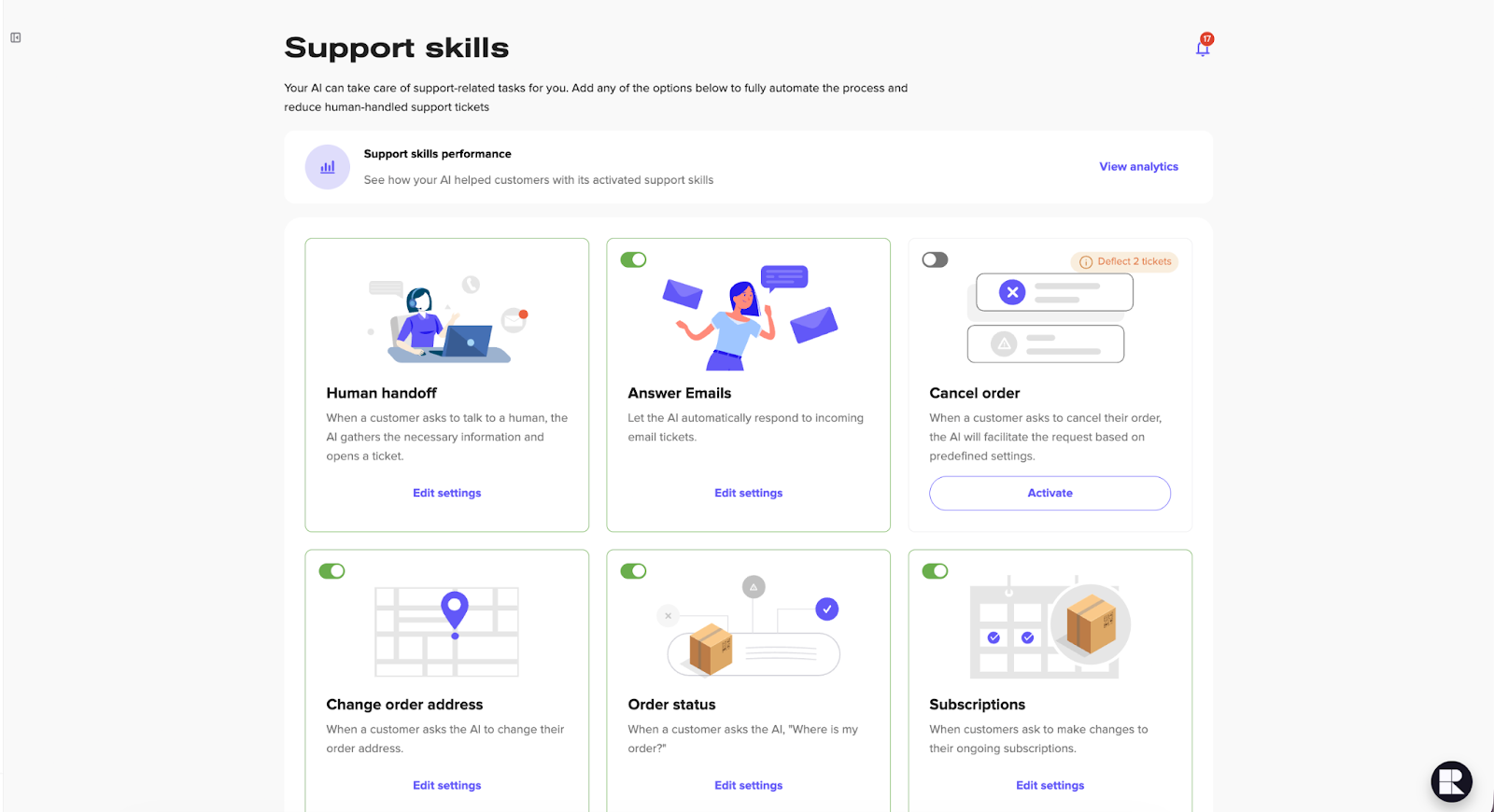
Rep AI handles WISMO through a feature called Support Skills, which consists of individual AI-powered automations that handle specific support tasks. You activate the ones you need and configure them to match your store's policies.
Order Status Skill for Core WISMO Handling
The Order Status skill is the foundation of your WISMO automation workflow inside Rep AI. When a customer asks about their order, the platform prompts for their email or order number, locates the order in Shopify, and responds with the current status, fulfillment stage, carrier details, and tracking links.
For split shipments, it returns multiple tracking numbers. If the customer can't provide an email or order ID, the AI falls back to alternative identifiers, such as a phone number or zip code, based on your configuration.
Adjacent Skills for Filtering Lookalikes
The decision flow in any WISMO automation workflow starts by separating true WISMO from tickets that look similar but need different handling. Rep AI does this through separate Support Skills that run alongside Order Status:
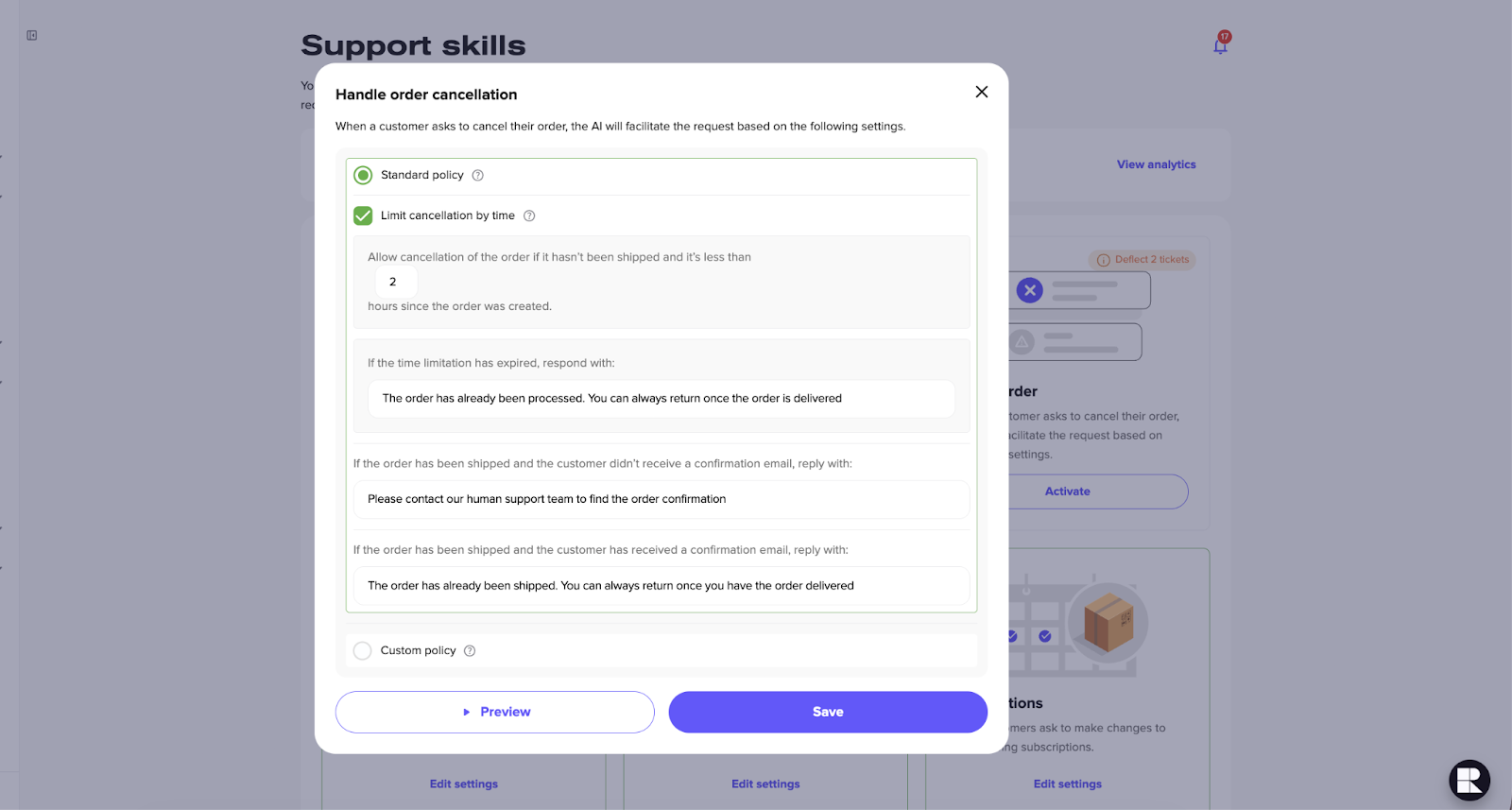
- Cancel Order: Processes cancellations in chat with configurable time limits to prevent conflicts with orders already being fulfilled
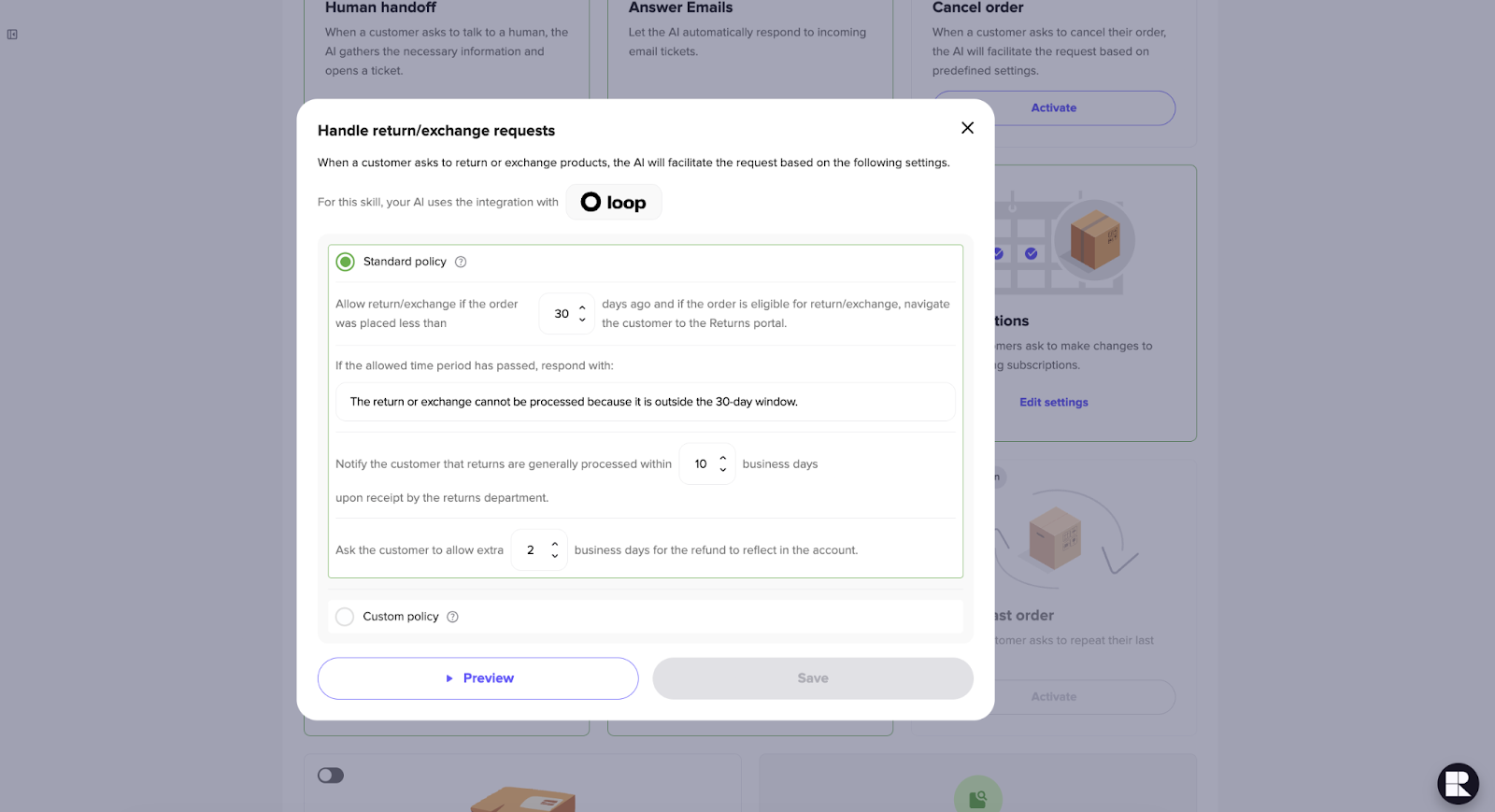
- Returns and Exchanges: Integrates with Loop to check return eligibility and provide a return link directly in the conversation
- Change Order Address: Let customers update shipping details in chat with time-based restrictions you define
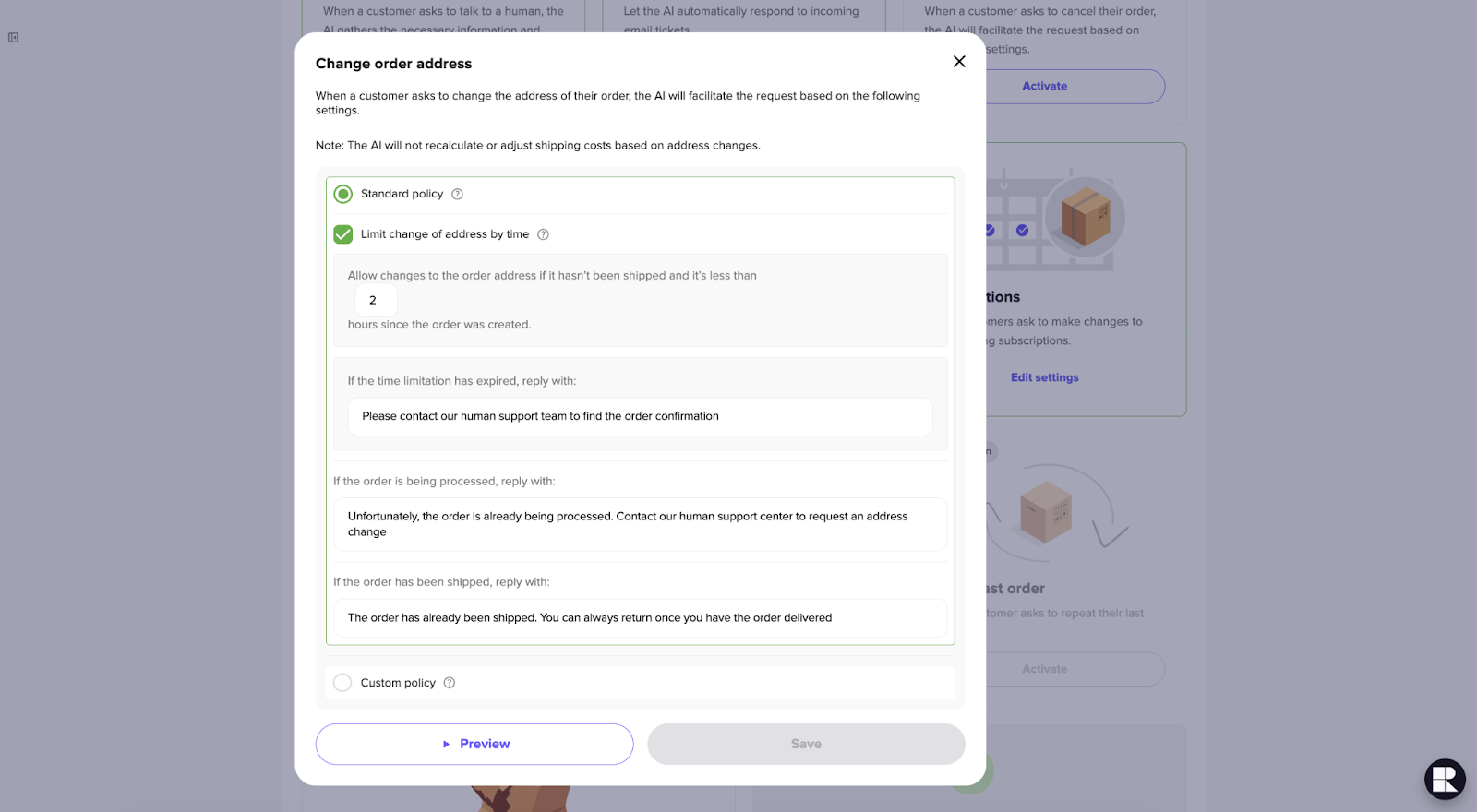
The AI separates these intents automatically. A customer asking, "I want to return this", enters the Returns flow. Meanwhile, a customer asking, "Where's my package?", enters Order Status.
Training, Guardrails, and Escalation
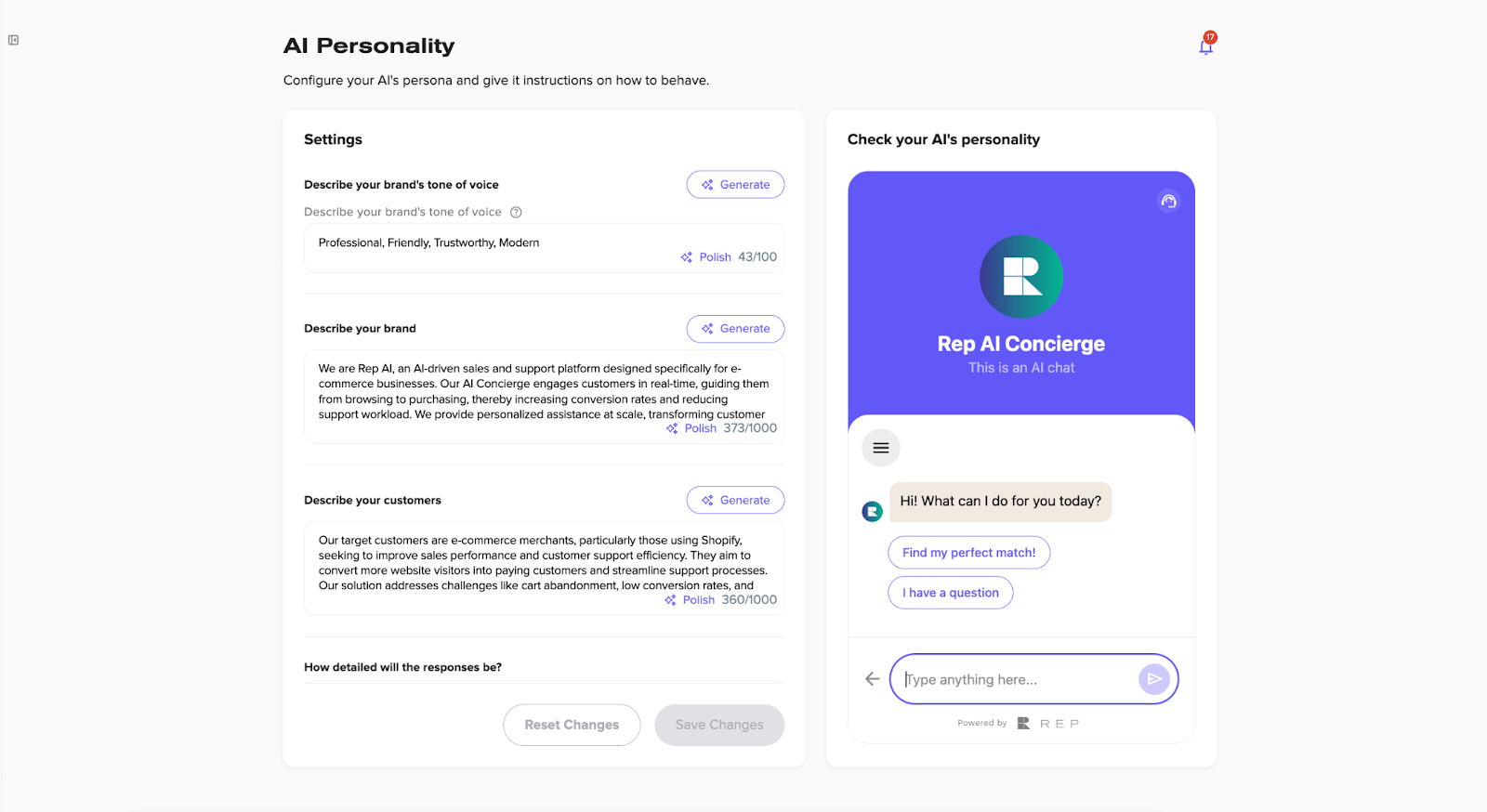
Rep AI supports unlimited file and URL uploads for training the AI on shipping policies, carrier timelines, and handling procedures.
Custom AI instructions let you define how the AI responds to each tracking state (delayed, stalled, delivered-not-received). The knowledge base auto-syncs whenever policies change, with a freshness timestamp so you can verify that the AI is using the latest information.
For cases that shouldn’t be automated, such as fraud-flagged orders or conflicting tracking, the platform escalates the conversation to a human agent.
Escalations go through Gorgias, Zendesk, Kustomer, Freshdesk, or Richpanel, with the full conversation context preserved. The chat remains active after the handoff.
Post-WISMO Segmentation Through Klaviyo
Every WISMO conversation syncs to the customer's Klaviyo profile through Conversation Sync. Topic tags like "shipping delay," "tracking confusion," or "delivered not received" become custom properties through Topic Sync.
This lets you build post-purchase flows based on what actually happened during the delivery experience rather than generic timers.
Rep AI takes 6 clicks to go live, learns your catalog in 3–10 minutes, and includes a 30-day free trial with a dedicated CSM for setup.
Measuring WISMO Automation Performance
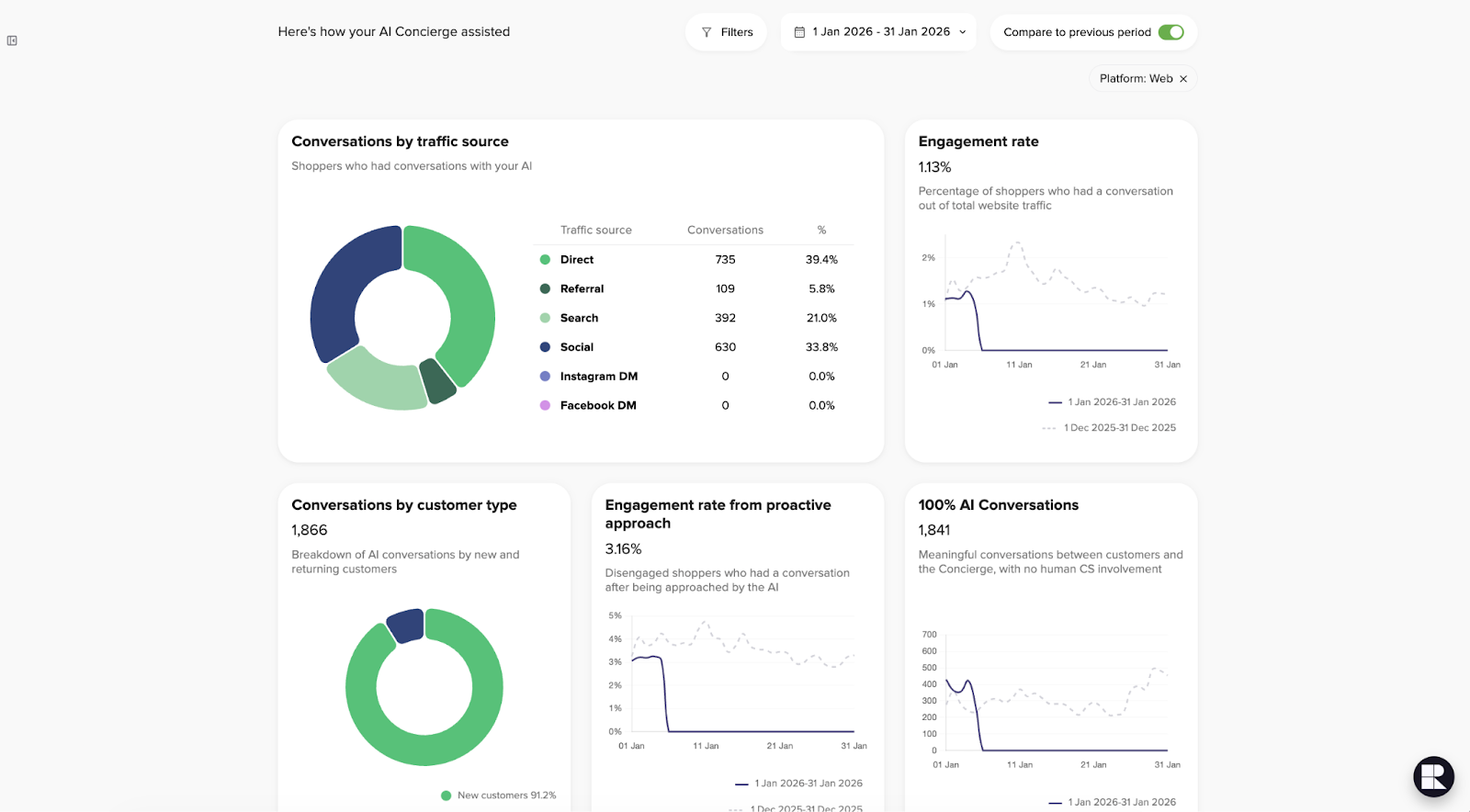
How do you check if your WISMO automation system is working well?
Fewer tickets alone don't mean WISMO automation is working. A system that deflects tickets but leaves customers confused will show up in recontact rates and refund leakage. Here are the five metrics that give you the full picture:
WISMO Query Rate
The number of WISMO tickets per 100 orders shipped. This is the cleanest measure of whether you're preventing contacts, and it normalizes for growth and seasonal volume spikes.
Containment Rate
The percentage of WISMO tickets fully resolved without a human reply. Track this by route (domestic vs. international) and by tracking state. A high overall rate can hide failures in one category. For example, "delivered not received" cases may need a much lower containment target by design.
First Response Time
WISMO is driven by anxiety. Speed matters more here than almost any other ticket type. Routine status checks should get instant responses. While exceptional cases of delays or lost packages should get fast human takeover, not slow queues.
Refund and Reship Leakage
Unclear tracking can lead agents to issue refunds while the package is still in transit or trigger both a refund and a reship for the same order. These duplicate resolutions accumulate quickly during peak periods. Tightening automation logic, especially around “likely delayed” and “delivered not received” states, reduces both types of leakage.
CSAT Paired With Recontact Rate
CSAT alone can be misleading. So, pair it with a recontact rate within 7 days on the same order. If customers return with the same question, the original response didn't set expectations clearly enough.
Rep AI’s analytics dashboard tracks support deflection and ticket reduction, breaking down whether issues were resolved by AI or handled by a human. It also measures CSAT and the ROI generated from support deflection. For a complete view, track WISMO query rate and refund leakage in your helpdesk and order management systems.
What to Expect After Automating WISMO
WISMO is structured, repetitive, and runs on a predictable set of signals, making it one of the safest support workflows to automate and one of the fastest to deliver ROI.
Most brands see query rates trending down within 4–8 weeks of going live. Containment rates are high for routine "in transit" states, while more complex cases, like delivered-not-received, are routed to humans by design.
The bigger shift happens when WISMO no longer consumes 30–50% of agent time. Freed capacity allows response times on complex tickets to improve and refund leakage to be managed more effectively.
Rep AI makes WISMO automation easier with pre-built Order Status and Support Skills, configurable guardrails, seamless human escalation, and full analytics to track containment, CSAT, refund leakage, and ROI.
Start a 30-day free trial to see how Rep AI handles WISMO tickets for your store and experience the efficiency gains firsthand.
More from REP AI

AI Shopping Assistant: How It Guides Ecommerce Shoppers in 2026
When a shopper hesitates, timely guidance can help them decide what to explore next. An ai shopping assistant can answer product questions, narrow choices, and guide product discovery without taking control of checkout. Shoppers get help comparing options, while still making the purchase decision th...
Benefits of Agentic Commerce: How AI Can Help Brands Sell and Serve Better
When a shopper hesitates, a useful answer can turn a moment of uncertainty into a chance to help, rather than a sale lost or a question left unanswered. The benefits of agentic commerce come from connecting shopper intent with timely action, then learning from those interactions to improve sales gui...
Want to see what your store would do with Rep?
Run your real Shopify catalog through the simulator before you commit to anything. No sales call required.

