


REP AI Customers: a 360° view of every shopper
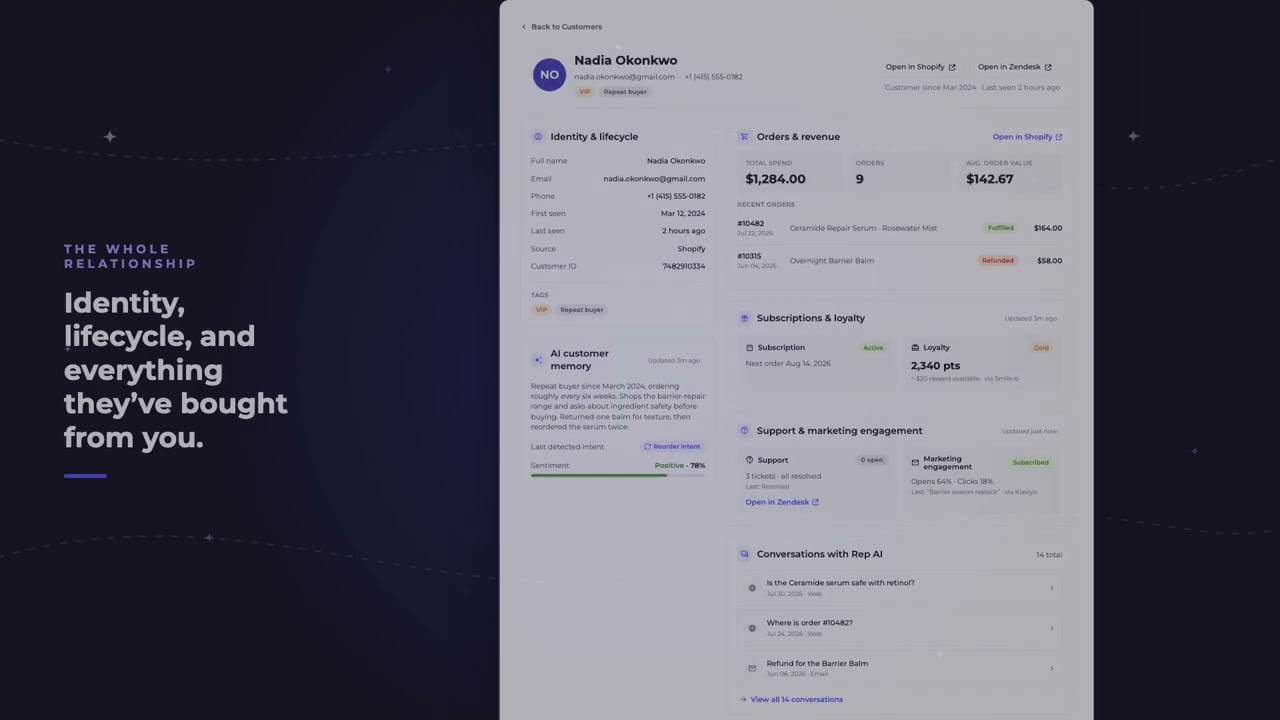
REP AI's Customers page gives you one profile for every shopper REP has identified: who they are, where they are in their lifecycle, everything they've bought, and tags pulled straight from your Shopify history with nothing to configure. Loyalty, subscriptions, support and marketing data come from the apps you've connected, and the AI customer memory shows the running summary REP writes about each shopper.
Chapters
Transcript
Customers in the left nav
Customers is a new item in your left nav. Every shopper REP has identified, searchable and filterable by tag.
Open a shopper's profile
Click a row to open that shopper's profile. Identity and lifecycle first, then everything they've bought, and tags that come straight from your Shopify history with nothing to configure.
Data from your connected apps
Loyalty and subscriptions read whichever apps you've connected. Here, Smile and Recharge. Support and marketing do the same. Zendesk tickets, Klaviyo opens and clicks.
REP's own read on the shopper
This part is REP's own. Your AI has been writing a summary of every shopper. Now you get to read it too.
Read-only, links to helpdesk
Profiles are read only. One link takes you straight to the record in your helpdesk.
Common questions
Where do I find customer profiles in REP AI?
Customers is an item in the left nav: a directory of every shopper REP has identified, searchable and filterable by tag. Click a row to open that shopper's profile.
Which apps does the REP AI customer view read from?
Loyalty, subscription, support and marketing data come from whichever apps you've connected; the video shows Smile.io, Recharge, Zendesk and Klaviyo. Shopify tags come in with nothing to configure.
Can I edit a shopper's profile on the Customers page?
No. Profiles there are read-only, and one link takes you straight to the record in your helpdesk.
See it working on your own store.

