


How REP AI turns shopper conversations into tips you can act on
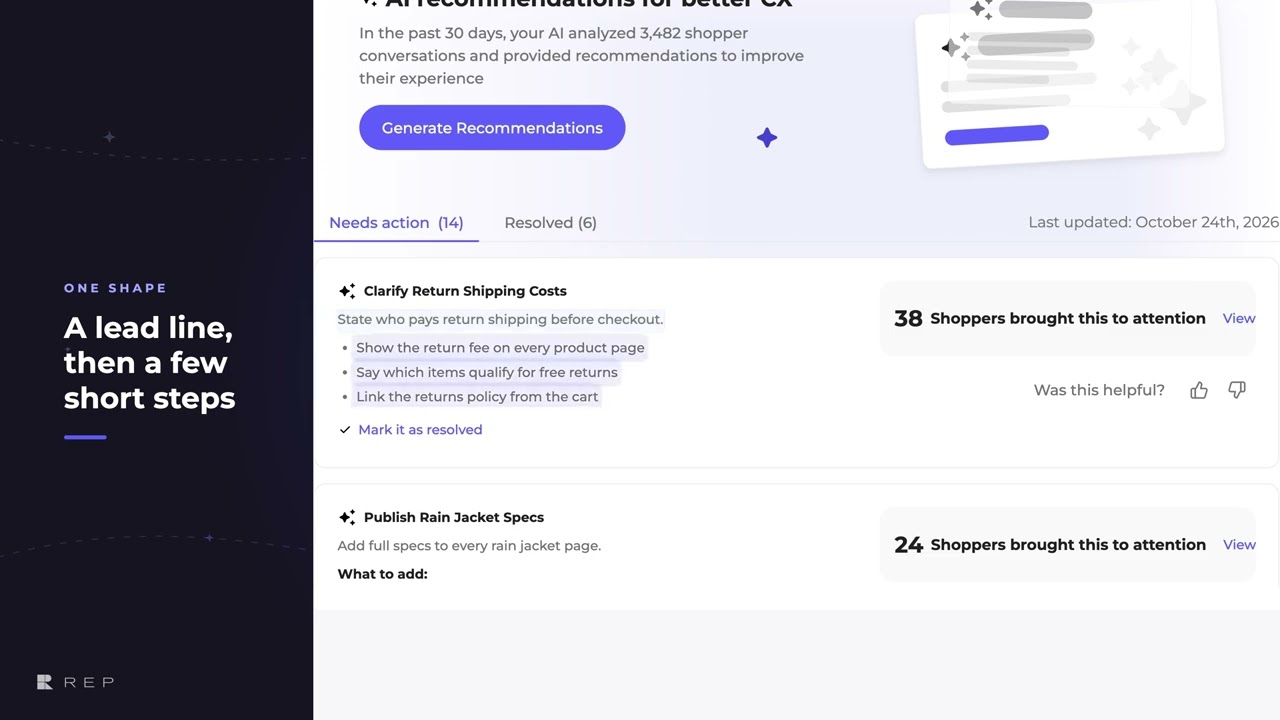
REP AI's AI Recommendations reads your shopper conversations and turns the problems that keep coming up into short tips: one line on what to do, then three to six concrete steps. Find them under AI Insights > AI Recommendations, where each tip shows how many shoppers raised it and View opens those conversations, and the top three also preview on the home screen.
Chapters
Transcript
AI tips you can scan
AI Recommendations reads your shopper conversations and turns the problems that keep coming up into tips you can act on.
One line, then steps
Every tip follows the same shape, one line that says what to do, then three to six short bullets, each one a single concrete step.
Show more and labels
Longer tips fold away behind Show more, so the list stays quick to skim. And when a tip covers two different things, each part gets its own short label.
Evidence and home preview
The number beside each tip is how many shoppers raised it, and View opens those exact conversations. On the home screen, the top three tips show the same structure in a compact preview.
Common questions
Can REP AI tell me what to fix based on shopper conversations?
Yes. AI Recommendations turns recurring problems in your shopper conversations into tips with one clear action and a few concrete steps.
How do I see the conversations behind a tip?
Each tip shows how many shoppers raised it; click View to open those exact conversations.
Where do I find AI Recommendations in REP AI?
Under AI Insights > AI Recommendations, and the top three tips also show in a compact preview on the home screen.
See it working on your own store.

