


REP AI audit log: see who changed your AI setup and when
REP AI's audit log lists every change to your AI setup with the time it happened and the teammate who made it. Account admins find it under Settings > Audit Log, with filters by change type, date range and teammate, a before-and-after view of each change, and CSV export.
Chapters
Transcript
Every setup change, one list
Every change to your AI setup lands here with the time it happened and the teammate who made it.
Filter by teammate
When an answer suddenly reads differently, the quickest lead is a name. The teammate filter keeps only the changes that one person made.
Before and after
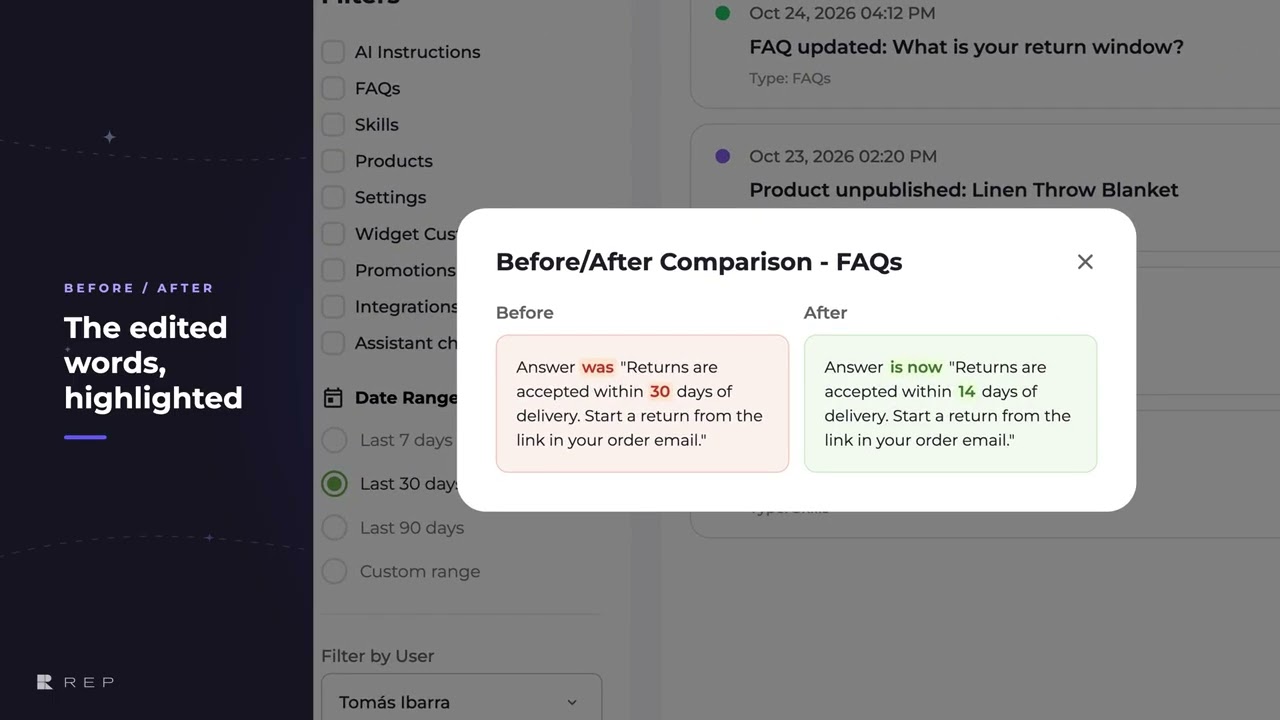
Each change opens before and after, side by side, with the edited words marked. You see what moved, not just that something did.
Admins only, CSV export
The log is for account admins, and export takes the list on screen out as a CSV file.
Common questions
Can I see who changed my AI settings in REP AI?
Yes. The audit log lists every change to your AI setup with the time and the teammate who made it, and you can filter it to one teammate.
Who can open the REP AI audit log?
Account admins, under Settings > Audit Log.
Can I export the REP AI audit log?
Yes. Export takes the list on screen out as a CSV file.
See it working on your own store.

