


How to build custom proactive sales skills in REP AI for Shopify
REP AI lets you build your own proactive sales skills: you set the shopper behaviour that triggers one, say in your own words what the AI should do, and choose the opening line, pages, audience and timing. Build one from Sales skills > Add new skill, starting from one of six templates or from scratch, and run up to 10 beside the pre-built skills.
Chapters
Transcript
A shopper with an empty cart
This shopper has browsed a while and still has an empty cart, a moment worth answering.
Add your own sales skill
Sales skills is where your AI's proactive moments live. Now you can add your own. Start from one of six templates, or build the trigger yourself. REP writes the condition back in plain English, so you can check it before you save.
AI goal and targeting
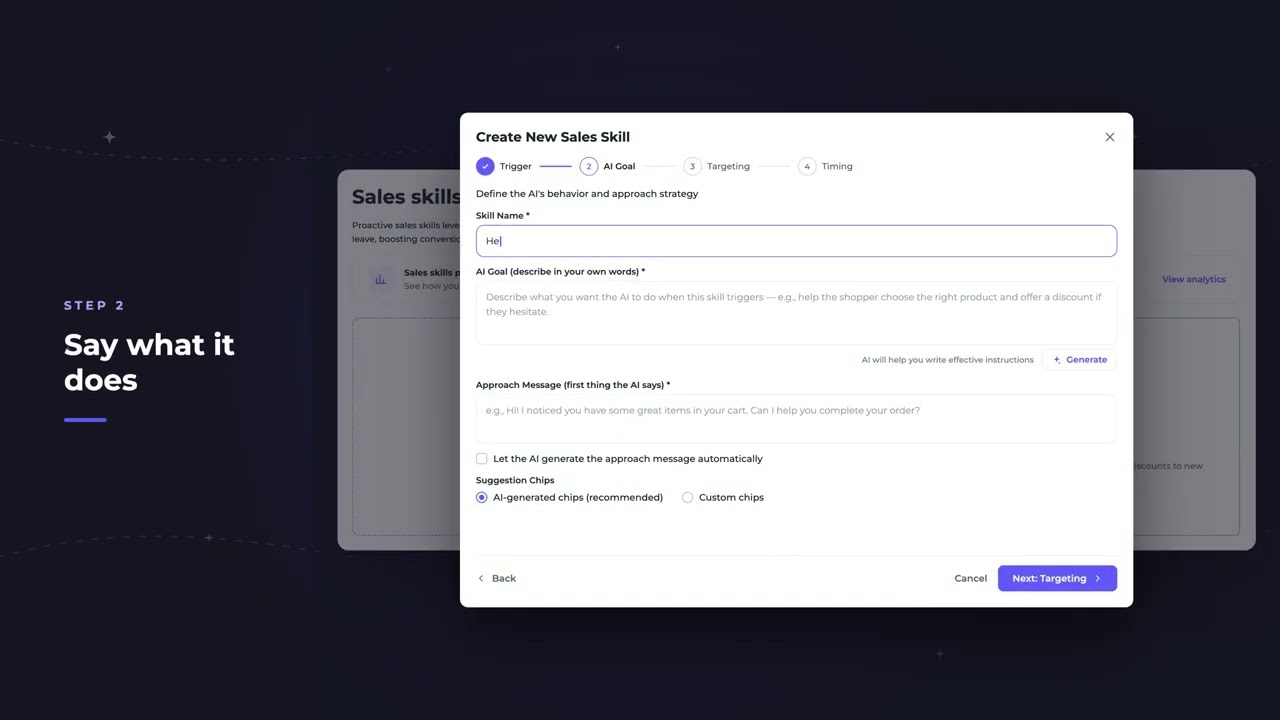
Then say what you want the AI to do, in your own words, not a script. Write the opening line yourself, or let the AI compose it. Choose where it runs and who sees it.
Timing and going live
Set the timing, check the summary, and finish. It goes live beside the pre-built skills. You can run up to 10.
Shopper view and results
Back on the storefront, the same shopper gets the message you wrote at the moment you chose. And every skill reports its own approaches, engagement, orders, and revenue.
Common questions
Can I create my own proactive messages in REP AI?
Yes. In Sales skills > Add new skill you set a trigger, describe the AI's goal in your own words, write the opening line or let the AI compose it, then choose pages, audience and timing.
How many custom sales skills can I run in REP AI?
Up to 10, alongside the pre-built sales skills.
Can I see how a custom sales skill performs?
Yes. Every skill reports its own approaches, engagement, orders and revenue.
See it working on your own store.

