


REP AI escalations by topic: see every topic, not just ten
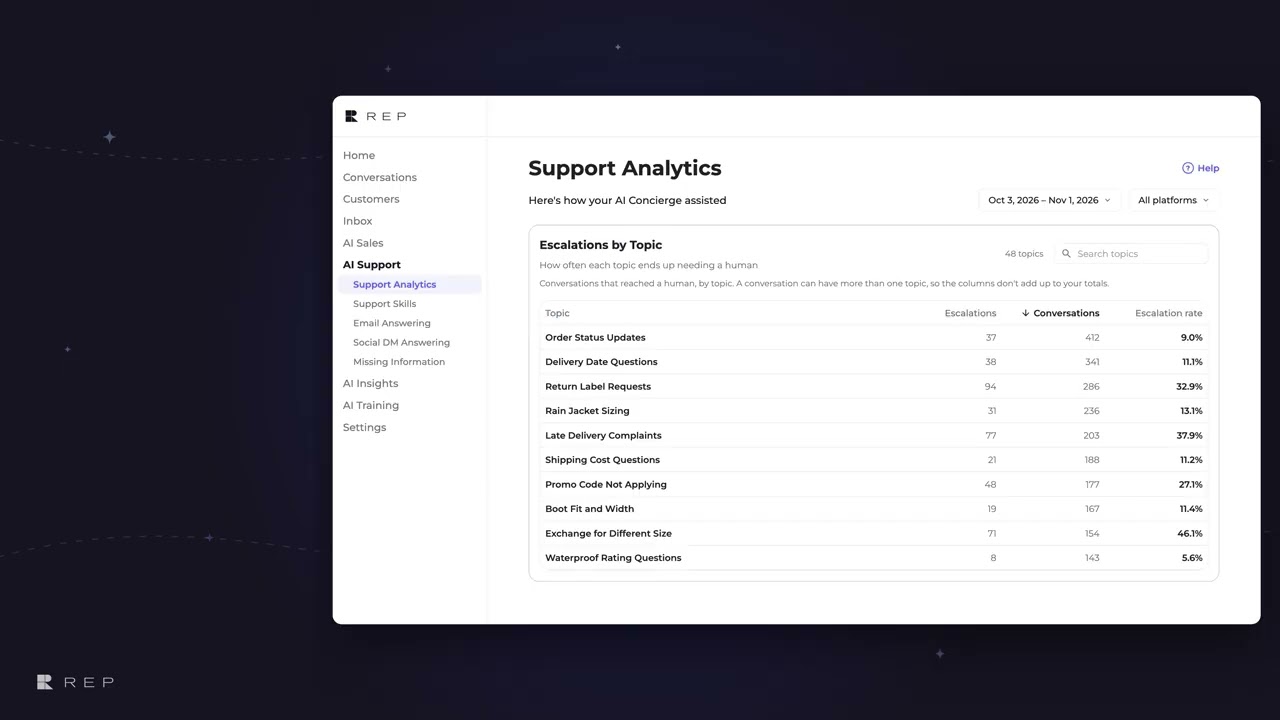
REP AI's Escalations by Topic card lists every topic with at least three conversations, not just ten, with how often each one ends up needing a human. Find it in AI Support > Support Analytics, where you can sort the whole list, search topics by name, and see a Low volume tag on any rate from fewer than 20 conversations.
Chapters
Transcript
Every topic listed
Escalations by topic shows every topic with at least three conversations. The full list, in a card that keeps one height.
Sort the whole list
Sorting covers the whole list, so the busiest topic is always there. And it re-sorts instantly, with no reload.
Low volume tags
A rate from fewer than 20 conversations gets a Low volume tag. The row keeps its place, the tag just says the number can swing.
Search topics by name
Once the list outgrows the card, a search box appears, and the count shows how many topics match.
Common questions
Which support topics does REP AI hand to humans most?
Escalations by Topic in Support Analytics shows each topic's escalations, conversations and escalation rate, and you can sort any column across the whole list.
What does the Low volume tag mean?
The rate comes from fewer than 20 conversations, so the number can swing; the row keeps its place in the list.
Does Escalations by Topic show every topic?
Every topic with at least three conversations is listed, and a search box appears once the list outgrows the card.
See it working on your own store.

