


How REP AI sets up Klaviyo flows from chat topics in one click
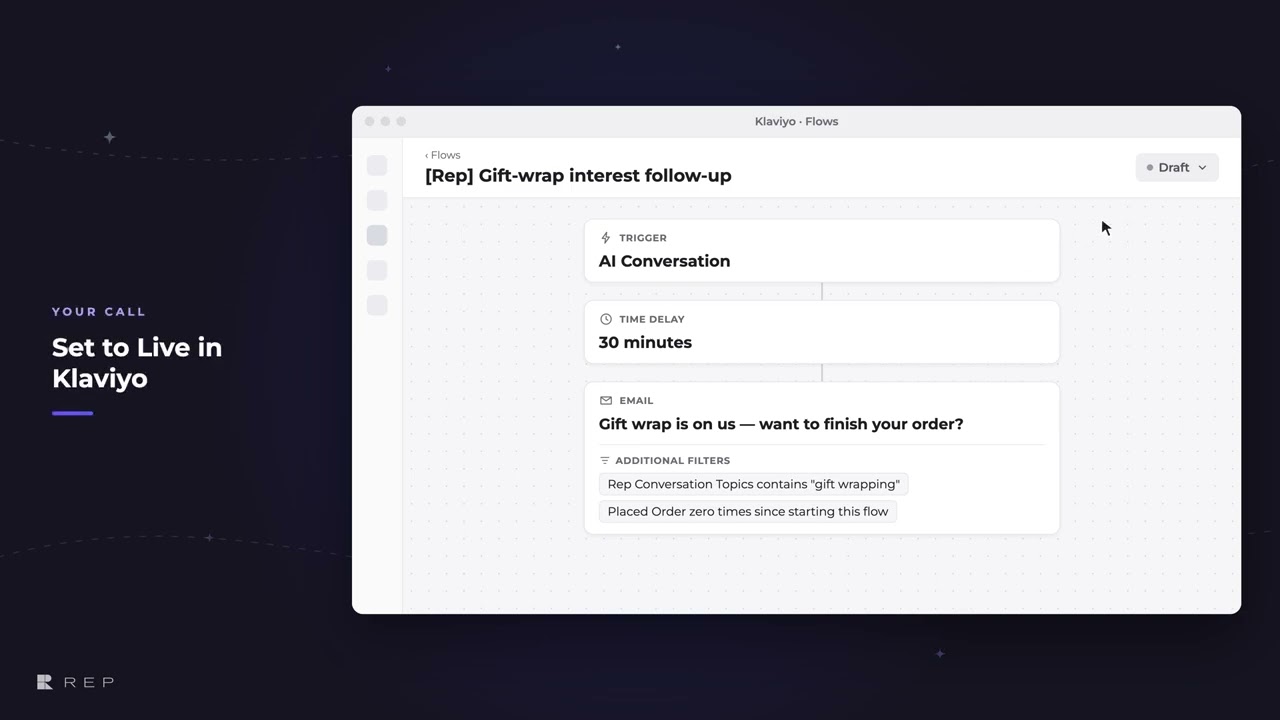
REP AI installs eight starter Klaviyo flows in one click, built on the topics shoppers asked about in chat. They are added to Klaviyo as drafts from the “What's next” card in the Console, and nothing sends until you set a flow to Live in Klaviyo.
Chapters
Transcript
Install eight Klaviyo flows
REP already writes what each shopper asked about onto their Klaviyo profile. One click turns that into eight starter flows.
Drafts land in Klaviyo
They land in Klaviyo as drafts. REP never publishes a flow and never sends an email.
How each flow works
Each flow starts when a shopper chats with REP. After a set delay, it checks what they asked about and whether they've ordered. Going live stays the merchant's call.
Status card in REP
Back in REP, the card reads every flow's status straight from Klaviyo. It stays amber until one is really sending, then it turns green.
Common questions
Does REP AI send emails through Klaviyo on its own?
No. REP AI adds the flows to Klaviyo as drafts and never publishes a flow or sends an email; you review the email, confirm the sender and set the flow to Live in Klaviyo.
What triggers the REP AI Klaviyo flows?
Each flow starts when a shopper chats with REP, waits a set delay, then checks what the shopper asked about and whether they have ordered.
How do I know when a REP AI Klaviyo flow is live?
The flow templates card in the REP AI Console reads each flow's status straight from Klaviyo. It stays amber until one flow is really sending, then turns green.
See it working on your own store.

