


REP AI Knowledge Base tags: group FAQs and files by topic
REP AI's Knowledge Base has a Tags column on file sources, URL sources and custom FAQs, so you can group your AI's knowledge by topic and filter to one topic across every content type. Find it under AI Training > Knowledge Base; tags are only for you, so nothing is re-processed and customers get the same answers.
Chapters
Transcript
Tags in the Knowledge Base
The Knowledge Base has a tags column now, on file sources, URL sources, and custom FAQs.
Create a tag inline
Type a topic, and if it doesn't exist yet, create it right there. It comes back already checked.
One tag, many sources
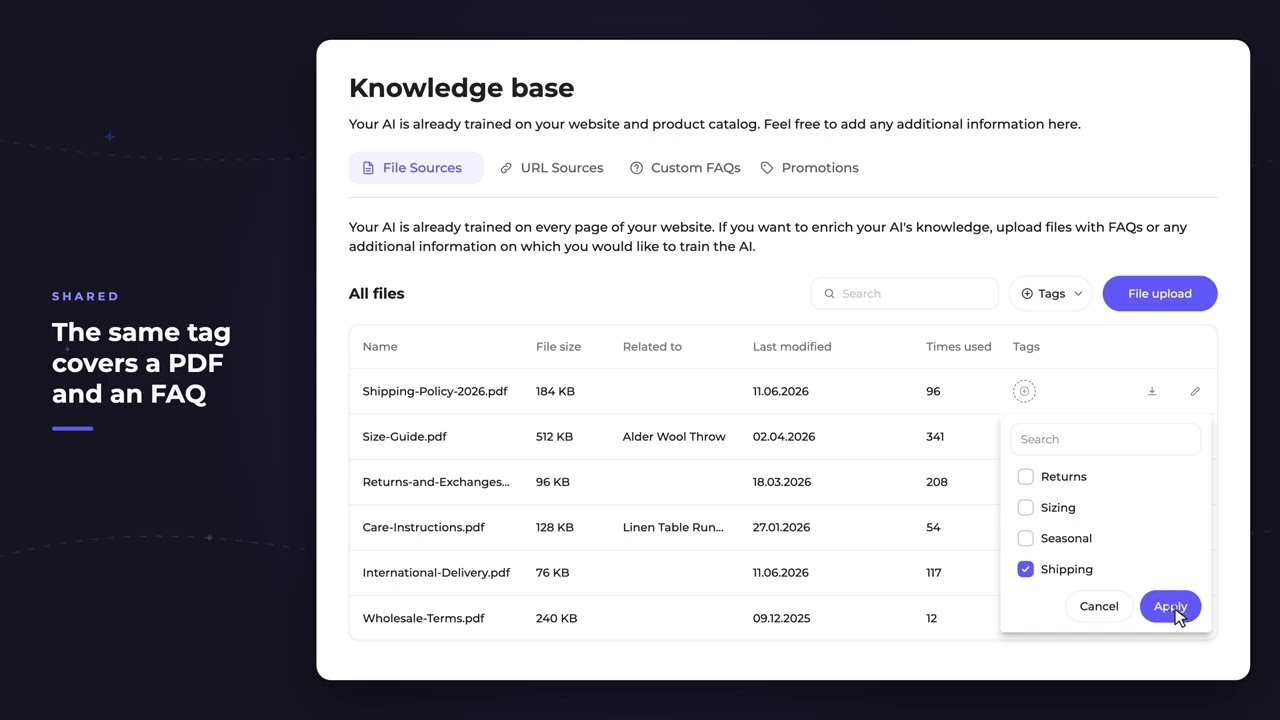
The tag list is shared. The same tag covers an FAQ and a PDF. Check it, apply, and it's on both.
Filter by topic
Filter the table down to one topic. Then switch tabs, the filter comes with you, so one topic pulls up everything.
Tags and your AI
Tags are for you, not for the AI. Nothing gets reprocessed.
Common questions
Can I tag FAQs and files in the REP AI Knowledge Base?
Yes. File sources, URL sources and custom FAQs all have a Tags column, and one shared tag list covers all of them.
Do tags change how the AI answers?
No. Applying, changing or deleting tags doesn't touch your content or trigger re-indexing, and the AI keeps searching the whole Knowledge Base.
Where do I find Knowledge Base tags?
In AI Training > Knowledge Base, on the File Sources, URL Sources and Custom FAQs tabs.
See it working on your own store.

