


Is REP AI answering on every channel? The activation checklist
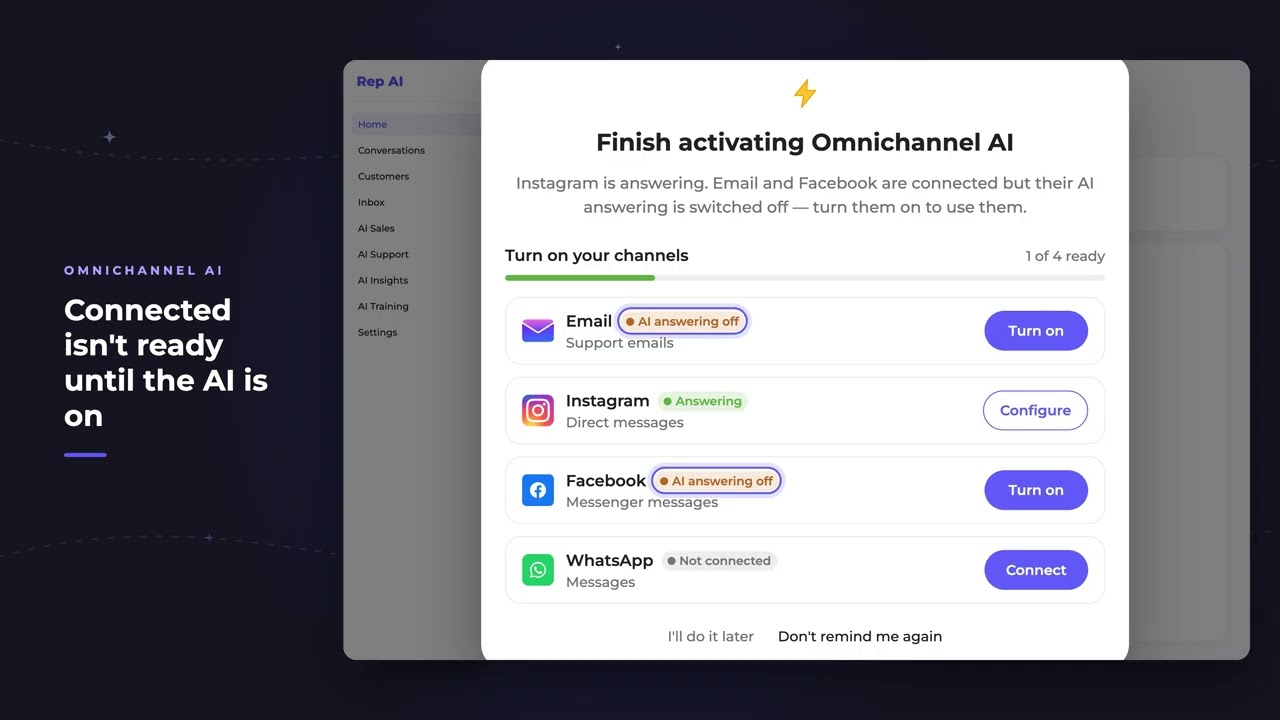
REP AI's Omnichannel AI activation checklist opens when you sign in and shows which connected channels the AI is actually answering on, for example 1 of 4 ready. It covers email, Instagram, Facebook and WhatsApp, each Turn on button switches on AI answering for that one channel only, and the popup closes itself once every connected channel answers.
Chapters
Transcript
Opens at sign-in
When an omnichannel merchant signs in, REP checks which connected channels are really answering, and says so upfront.
Connected isn't answering
Connected is not the same as answering. Email and Facebook are linked, but their AI is off, so neither one counts as ready.
One click per channel
Each button switches on AI answering for that one channel, and leaves every other setting as it was. This app isn't connected yet, so there's nothing to switch on there. Once every connected channel answers, the reminder steps aside.
Common questions
How do I know which channels REP AI is answering on?
When you sign in, the Omnichannel AI checklist shows each connected channel's status, such as 1 of 4 ready, and which ones still have AI answering switched off.
Does turning on one channel change my other settings?
No. Each button switches on AI answering for that one channel and leaves every other setting as it was.
Do I need Support Skills for AI email answering?
No. Per the October 2026 product update, AI email answering no longer needs Support Skills; the checklist switches on email answering only, not the other support skills.
See it working on your own store.

