


How REP AI checks your chat widget colors for readability
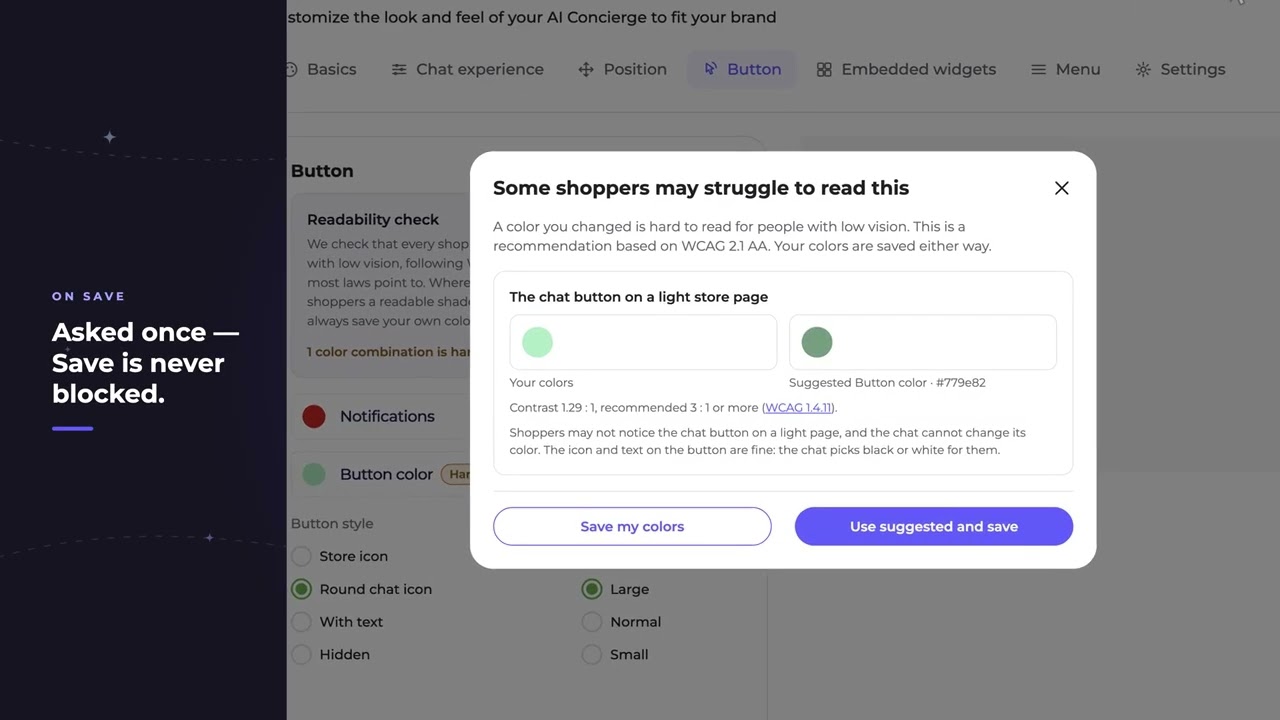
REP AI checks every chat widget color you pick against WCAG 2.1 AA and flags combinations that are hard to read, such as a pale chat button on a light store page. It sits under Chat widget > Button, asks once on save with the nearest readable shade of your own color, and never blocks you from keeping your own colors.
Chapters
Transcript
Where's the chat button?
A soft brand color can look lovely in the Console and fade right into a light store page.
Checked against WCAG 2.1 AA
Every color you pick is checked against the accessibility standard most laws point to. The chat repaints most colors for shoppers on its own. The button lives on your page, so it can't.
Asked once on save
Your colors are always yours to keep. The check asks once and offers the nearest shade of your own color that still stands out. A deeper shade of the same green, and now every shopper can find the chat.
Common questions
Does REP AI check my chat widget colors for accessibility?
Yes. Every color you pick in the widget settings is checked against WCAG 2.1 AA, the accessibility standard most laws point to, and hard-to-read combinations are flagged.
Will REP AI change my brand colors?
No. On save it asks once and suggests the nearest readable shade of your own color, but you can always save your own colors.
Why does REP AI flag the chat button but not the other colors?
The chat repaints most colors for shoppers on its own, but the button sits on your store page, so it can't adjust it for you.
See it working on your own store.

