


How REP AI manages Recharge subscriptions in chat on Shopify
REP AI manages Recharge subscriptions in chat: it finds the shopper's subscription, names the exact delivery, and skips it or changes how often it ships only after the shopper says yes. Connect Recharge under Integrations > Subscriptions, then turn each action on or off in the Subscription Management skill; an action that's off is never offered to the shopper.
Chapters
Transcript
Skip the next delivery
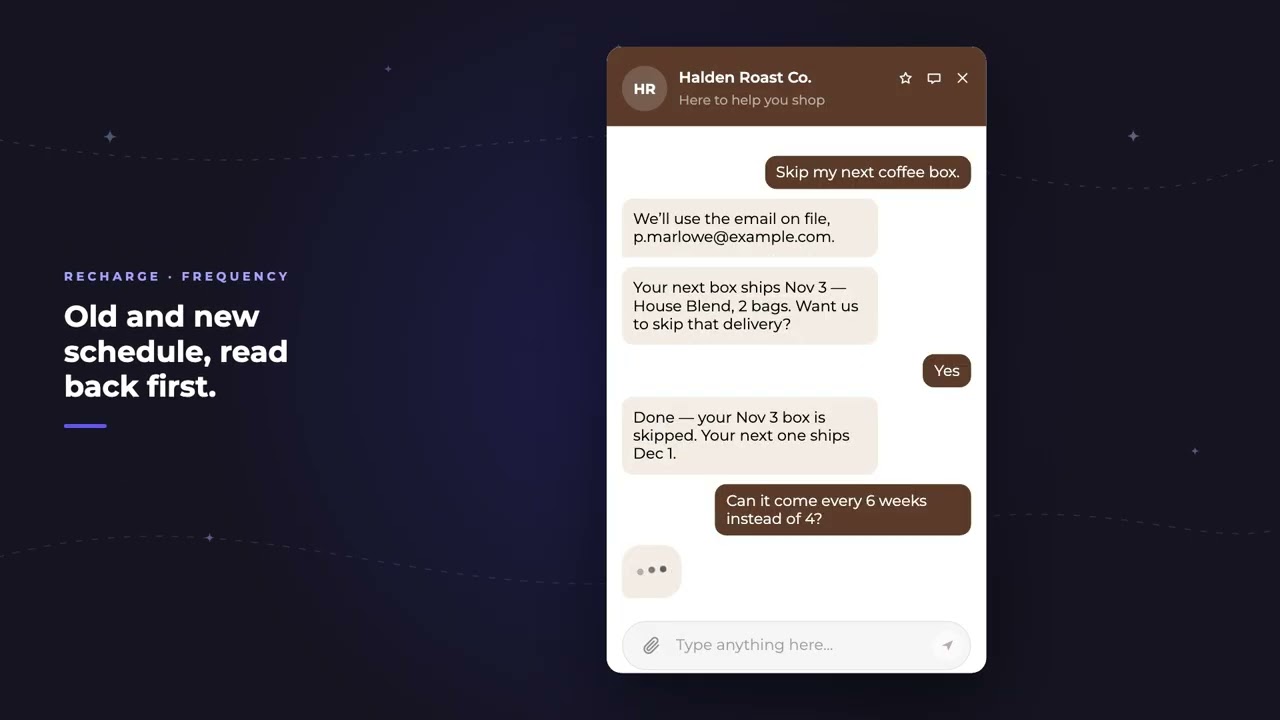
The AI finds the shopper's subscription, and names the exact delivery, the date, and what's in the box. Nothing changes until they say yes. Then the skip goes straight to Recharge.
Change delivery frequency
Changing how often it arrives works the same way. The current schedule, the new one, and a yes before anything moves.
One switch per action
Every action has its own switch, and an action that's off is never offered to the shopper.
Common questions
Can REP AI skip a Recharge delivery for a shopper?
Yes. It names the delivery, the date and what's in the box, waits for the shopper's yes, then skips it in Recharge.
What can't REP AI change on a Recharge subscription?
It can't yet pause a subscription or change the product, quantity or charge date.
Where do I turn on Recharge actions in REP AI?
Connect Recharge under Integrations > Subscriptions, then switch each action on or off in the Subscription Management skill and save.
See it working on your own store.

