


REP AI weekly digest: AI Maturity score and your next step
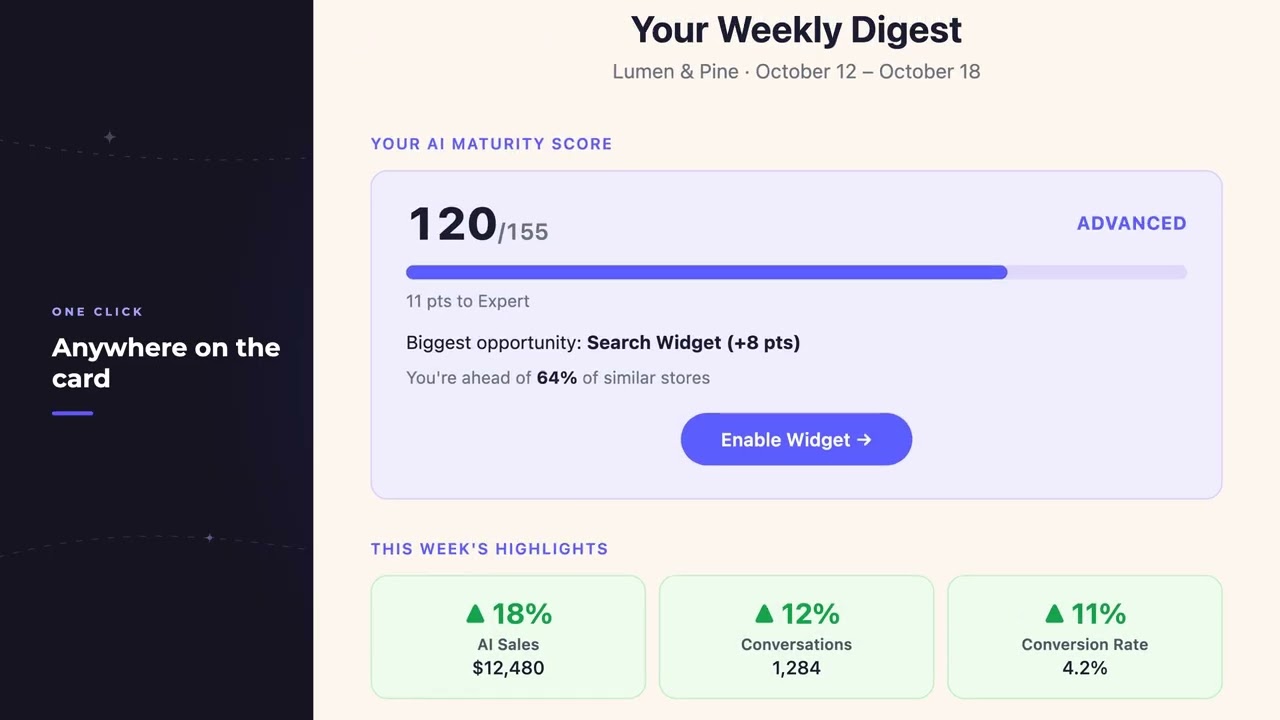
REP AI's weekly digest email opens on your AI Maturity score, showing where the store stands and how far it is to the next tier, followed by one next step. That step is the open feature worth the most points that you can switch on now, one click on the card lands on that setting in the Console, and the same score sits at the foot of the Console sidebar.
Chapters
Transcript
Score first
The weekly digest opens on your AI Maturity score, where the store stands and how far it is to the next tier.
One next step
Under the score sits one next step, the open feature worth the most points that this store can switch on right now.
One click to the setting
The whole card is a single link and it leads to the feature itself, the screen where it gets switched on. The page lands on the setting the email named, outlined for a moment so the eye finds it first.
Score in the sidebar
The same score sits at the foot of the Console sidebar, on every page, between one digest and the next.
Common questions
What is the AI Maturity score in REP AI?
A score shown at the top of the weekly digest and at the foot of the Console sidebar that tells you where your store stands and how far it is to the next tier.
How do I raise my REP AI AI Maturity score?
The weekly digest names one next step, the open feature worth the most points you can switch on now, and clicking the card takes you straight to that setting.
Where can I see the AI Maturity score outside the email?
At the foot of the Console sidebar, on every page.
See it working on your own store.

