


Can REP AI tell if a shopper saw a WhatsApp reply? Yes
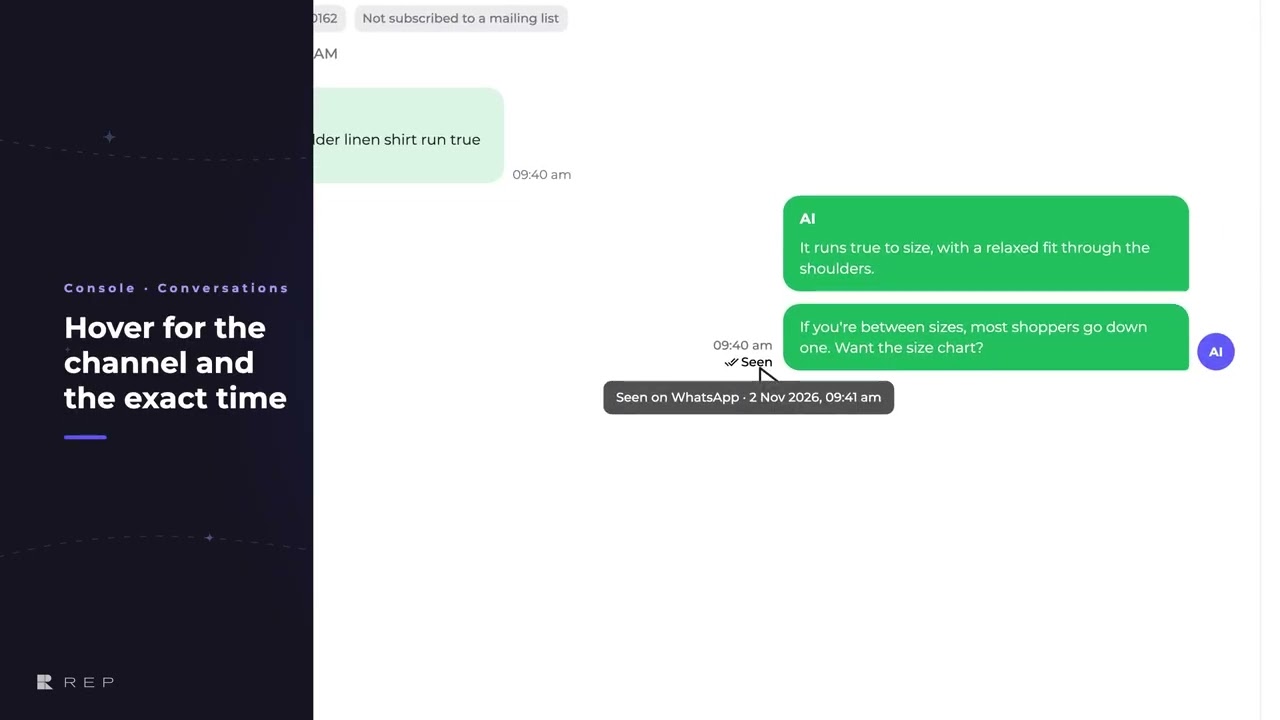
Yes, REP AI marks each reply the shopper has seen with “Seen”, shown here on WhatsApp, where WhatsApp tells REP when the shopper opens the chat. The Seen mark shows under the reply in Console > Conversations for Instagram, Facebook Messenger and WhatsApp, with the moment they first saw it on hover; it is not shown in Rep Inbox.
Chapters
Transcript
A reply on WhatsApp
On WhatsApp, REP answers the shopper right in the chat, but did they ever see it? When the shopper opens the chat, WhatsApp tells REP, and the Console marks every reply
The Seen mark
they've seen up to that moment. The mark carries the moment they first saw it, in your own time zone.
Newer replies wait
A newer reply stays unmarked, until they open the chat again. And no mark never means ignored: some shoppers turn read receipts off. So you can tell a shopper who never saw the answer from one who saw it and moved on.
Common questions
Does REP AI show read receipts for WhatsApp and Instagram?
Yes. In Console conversations, replies the shopper has read on Instagram, Facebook Messenger or WhatsApp get a Seen mark, with the moment they first saw it on hover.
If there's no Seen mark, did the shopper ignore the reply?
Not necessarily. Some shoppers turn read receipts off, and a newer reply stays unmarked until they open the chat again.
Can I see Seen marks in Rep Inbox?
No. The Seen mark shows in Console conversations only, not in Rep Inbox.
See it working on your own store.

