


Adobe Commerce AI Support Integration: What to Evaluate in 2026

Can an Adobe Commerce AI support integration connect to your store without disrupting customer context or existing support workflows? Answer that before comparing features. A platform’s general integration claims don’t prove compatibility with your specific Adobe Commerce setup.
Adobe Commerce offers native AI capabilities, but a separate support platform also needs to fit your channels, data access, escalation paths, and team’s operating model. Rep AI’s direct Adobe Commerce compatibility has not been confirmed, so verify the connection and implementation requirements rather than assuming a connector exists.
This guide explains what to check before implementation: which customer and order data the platform can access, how conversations move across supported channels, what happens when a request needs a person, and who owns each operational step. You’ll also see how to assess Rep AI’s Website Concierge, Rep AI Inbox, and Omni-Channel AI as capabilities to evaluate, not as proof of Adobe Commerce compatibility. The result is a practical way to judge fit and identify a low-friction next step without making unsupported integration assumptions.
• Define the support outcomes you need, then ask vendors to demonstrate compatibility with your Adobe Commerce setup.
• Trace the data and events a platform requires, how information moves, and which technical requirements need confirmation.
• Compare platforms on verified channel coverage, shopper intelligence, and human handoff, not broad claims or roadmap promises.
• Run a limited test with clear success measures before expanding automation across support journeys.
• Assess Rep AI’s sales, support, and behavioral intelligence capabilities as potential fit criteria, while confirming compatibility and implementation scope directly.
Adobe Commerce AI support integration: define the fit before choosing a platform
An AI support integration connects shopper conversations with support workflows and relevant commerce context, but only when the vendor’s connection to your store platform is confirmed. The practical goal is to answer questions with useful context, route requests appropriately, and preserve a clear path to human support when automation isn’t enough.
A vendor saying it “integrates with ecommerce” doesn’t establish that it supports Adobe Commerce. Look for evidence: a documented connector or implementation path, a clear explanation of data flows, and a deployment tested against an environment like yours. Rep AI focuses on mid-market Shopify Plus brands, and direct Adobe Commerce support has not been confirmed. Treat fit for your stack as an open question to verify.
What an AI support integration should connect
Start with the shopper’s question and the workflow that should follow. Someone asking about an order may need a different response or escalation from someone comparing products on a product page. For each scenario, ask what information the system can access, which events it can respond to, and how that context appears to shoppers or support staff. Don’t assume access to Adobe Commerce orders, catalog data, or events without confirmation.
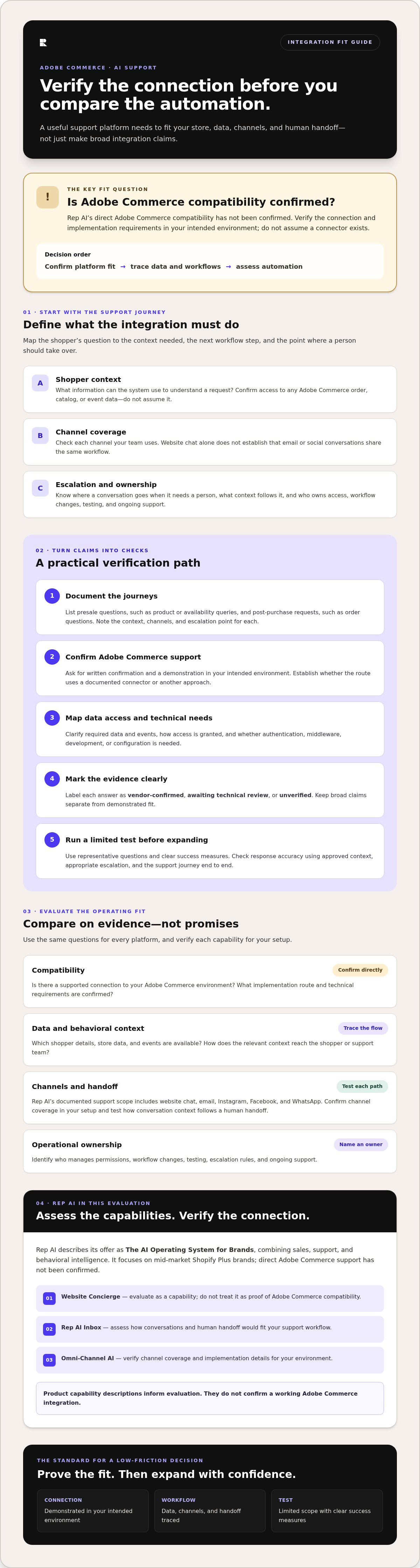
Map the full support journey, not just the chat window:
Shopper context
What information can the system use to understand a request?
Channel coverage
Does support extend beyond website chat to the email and social channels your team uses?
Escalation
Where does a conversation go when it needs a person, and what context follows it?
Ownership
Who manages access, workflow changes, testing, and ongoing support?
Why platform fit comes before automation claims
A useful feature can still be irrelevant if it can’t work with your platform or channels. Website chat is one touchpoint; it doesn’t prove that email or social conversations connect to the same support workflow. Confirm each channel separately, along with any authentication, middleware, or development requirements. Rep AI describes its offer as The AI Operating System for Brands, combining sales, support, and behavioral intelligence. Its AI support capabilities can inform your evaluation, but that overview is not proof of Adobe Commerce compatibility.
Compatibility means a confirmed, usable connection between the support platform and your actual commerce stack. Ask for a demonstration in your intended environment, then verify the data flow and escalation path with the people who will own them. Only after those checks should automation claims shape your decision.
How to assess an Adobe Commerce AI support integration step by step
Evaluate the connection before you evaluate the automation. A structured review shows what the platform can support, what needs technical work, and who will own the result. Use these steps to turn vendor claims into testable requirements.
Document support journeys.
List common presale questions, such as product or availability queries, alongside post-purchase requests like order questions. For each journey, note the context needed to respond, when a person should take over, and the channels involved. Base your scope on the channels customers actually use.
Confirm Adobe Commerce compatibility.
Ask the vendor to confirm in writing whether Adobe Commerce is supported and describe the implementation route. Request a demonstration in your intended environment. Clarify whether the connection uses a documented connector or another approach, and what development, middleware, or configuration it requires. Rep AI focuses on Shopify Plus, and direct Adobe Commerce support has not been confirmed.
Map data access and channel coverage.
Ask what data and events are required, how access is granted, and which channels are supported in your setup. Mark each answer as vendor-confirmed, awaiting technical review, or unverified. Rep AI’s documented support scope includes website chat, email, Instagram, Facebook, and WhatsApp. Its AI support platform overview provides product context, not proof of Adobe Commerce compatibility.
Set test cases before rollout.
Choose representative questions and define success criteria: accurate responses using approved context, appropriate escalation, and a clear customer experience across the channels being tested. Include cases where information is missing or a request needs a person. Review results with support and technical teams before expanding the test.
Assign ownership and review results.
Name the people responsible for configuration, escalation rules, data review, and ongoing support. After testing, assess errors, handoff quality, and workflow impact. Agree on what must be resolved before expanding automation. Don’t apply claims such as “one-click install” or “live in days” to Adobe Commerce unless the vendor confirms they apply to your specific setup.
Keep an implementation record with each requirement, its evidence, its owner, and its status. This gives support, commerce, and technical teams a shared basis for a go or no-go decision. To assess Rep AI’s fit directly, discuss your Adobe Commerce requirements, including compatibility, implementation scope, and channel needs.
Compare support platforms by compatibility, channel coverage, and shopper intelligence
A feature list can make two platforms look similar while hiding the question that matters most: will the system work with your store, channels, and support process? Compare evidence against your requirements. Mark each item confirmed, unconfirmed, or unavailable. Silence is not confirmation, and a roadmap item is not a current capability.
Use a vendor-fit table, not feature-counting
Use a comparison table like this during vendor review. The Rep AI column reflects its documented capabilities. Ask vendors to substantiate every Adobe Commerce claim and identify what still needs technical review.
| Evaluation area | Rep AI evidence to date | What to verify |
|---|---|---|
| Commerce platform | Shopify Plus focus is documented; Adobe Commerce support is unconfirmed. | Written compatibility confirmation and the implementation route. |
| Channels | Website chat, email, Instagram, Facebook, and WhatsApp are documented. | Which channels are available in the proposed Adobe Commerce setup. |
| Data access | Shopper Intelligence and behavioral intelligence are documented; Adobe Commerce data access is unconfirmed. | Required data, supported events, access method, and any technical dependencies. |
| Escalation | Rep AI Inbox is a built-in helpdesk; Adobe-specific context transfer is unconfirmed. | How and where conversations escalate, and what shopper context follows. |
| Implementation ownership | Adobe-specific setup responsibilities are unconfirmed. | Who configures, tests, reviews data, and maintains the connection. |
This approach also clarifies workflow differences. A reactive helpdesk centers on handling incoming requests; a narrow chatbot may address a limited chat use case. A unified approach can bring sales, support, and shopper intelligence together, but only if the required platform connection, channels, and handoffs are verified. Don’t rank vendors on broad claims. Compare demonstrated fit against the same criteria.
Assess whether shopper intelligence supports the workflow
Shopper intelligence is useful when it helps teams understand patterns across sales and support conversations, not simply when a platform displays more data. Rep AI’s Data & Insights Platform includes Shopper Intelligence and Deep Research. How these capabilities connect to Adobe Commerce data, and whether Deep Research can support Klaviyo segmentation in this setup, need confirmation. Treat both as questions for the vendor, not assumed integration features. Review the Shopper Intelligence and data platform overview for details about Rep AI’s data offering.
For an Adobe Commerce support-platform evaluation, make the comparison decision-ready: preserve the evidence behind every status, record unanswered questions, and keep roadmap items separate from what you can test now.
Prepare an Adobe Commerce support integration checklist before launch
A launch checklist turns an Adobe Commerce AI support integration from a feature discussion into an operational plan. Agree on customer outcomes first, then define the channels, data, safeguards, tests, and owners required to pursue them. Tie every item to a person who can confirm it.
Align teams on channels, Skills, and escalation
Set the launch boundary with support, commerce, and technical stakeholders. Name the website, email, and social messaging channels in scope, and verify that the proposed platform supports each one for your setup. Define the Skills, or configurable agent behaviors, needed for the selected journeys. For example, a product question and an order-related request may need different context and escalation rules. Specify when a human should take over and which team owns the handoff.
Use this readiness checklist
Business goal
State the outcome to improve, such as handling routine product questions accurately or identifying conversations that need a support specialist.
Channel scope
List the customer-facing channels included in the test and confirm coverage with the vendor.
Data access
Document the information and events the workflow needs. Have the vendor and technical owner confirm access, permissions, and implementation dependencies.
Escalation
Define the triggers for human review, the destination for handoffs, and the context the receiving team needs.
Testing
Select representative questions, including cases where information is incomplete or the request falls outside the intended Skill. Record expected answers and handoff behavior.
Ownership
Assign people to configuration, data review, escalation rules, issue resolution, and approval to expand the test.
Measure outcomes before expanding
Start with a limited test across a defined set of support journeys. Agree on measurement definitions in advance: what counts as a handled interaction, a resolved request, a human handoff, or rescued revenue. For revenue, decide what evidence connects the interaction to the outcome before reporting it. Keep observed results separate from estimates, and don’t present an unverified benchmark as a target. Review answer quality, handoff appropriateness, customer feedback, and workflow impact with the owners before broadening the scope.
For wider context on connecting support performance with customer and revenue outcomes, read this AI customer support overview. If you’re assessing Adobe Commerce fit, discuss your integration requirements with Rep AI, including compatibility, channels, data access, and ownership, before planning a launch.
Where Rep AI fits, and what to confirm for Adobe Commerce
Rep AI positions itself as The AI Operating System for Brands, bringing proactive sales, support, and behavioral intelligence together. That combination may be relevant to brands looking to connect shopper engagement with support operations. Product scope and platform compatibility are separate questions: direct Adobe Commerce integration has not been confirmed. Treat Adobe Commerce fit as something to verify, not an available capability to assume.
Match Rep AI’s documented capabilities to the use case
Rep AI’s Website Concierge uses a Rescue algorithm that reads 500+ behavioral signals to intervene at exit intent. This supports proactive shopper engagement. It does not mean the product processes payments or completes checkout. For brands considering sales and support together, explore Rep Sales alongside the support capabilities, while verifying what data and events an Adobe Commerce setup could make available.
Rep AI Inbox is a built-in helpdesk. Omni-Channel AI supports website chat, email, Instagram, Facebook, and WhatsApp. Confirm which of these channels can connect to your intended workflows and how conversation context reaches the support team. These capabilities describe Rep AI’s product scope; they don’t confirm that its workflows connect directly to Adobe Commerce.
Confirm fit in a practical conversation
A useful evaluation starts with your actual commerce setup, not a generic platform checklist. Bring the Adobe Commerce version and environment details your team can share, the channels you plan to support, and examples of key shopper journeys. Include the data your workflows need, escalation rules, and any implementation constraints your technical team has identified.
Ask Rep AI to confirm whether Adobe Commerce is currently supported and, if so, the specific implementation path. Verify required data access, supported events, authentication, and whether middleware or development work is involved. Also ask who owns configuration, testing, and ongoing support. Don’t apply deployment statements such as “one-click install” or “live in days” to Adobe Commerce unless Rep AI confirms they apply to your setup.
Rep AI may be worth evaluating if you want proactive sales engagement, support, and behavioral intelligence in one platform. The decision depends on verified compatibility and a workable scope for your channels and team. Book a demo to confirm platform fit, implementation scope, and the workflows you need.
Make your next step a verified fit check
A strong Adobe Commerce AI support integration starts with evidence, not assumptions. Confirm the platform connection, required data access, channel coverage, escalation path, and implementation owner before choosing a solution. Then use a focused test and agreed measures to decide whether it’s ready to expand.
Rep AI brings sales, support, and behavioral intelligence products together. Website Concierge’s Rescue algorithm reads 500+ behavioral signals to identify exit intent. Those capabilities may suit your goals, but Adobe Commerce compatibility has not been confirmed and must be checked directly with Rep AI.
Bring your Adobe Commerce setup, support channels, and priority workflows to a fit discussion. Confirm the implementation route and technical requirements before planning a launch. Book a demo to confirm Adobe Commerce fit and identify a practical next step for your team.
With clear requirements and verified answers, you can move forward with confidence and keep the focus on better shopper experiences and rescued revenue.
Frequently Asked Questions
Does Rep AI integrate directly with Adobe Commerce?
Direct Rep AI integration with Adobe Commerce has not been confirmed. Rep AI focuses on mid-market Shopify Plus brands, so check Adobe Commerce compatibility directly rather than assuming it from general platform claims. Ask whether Adobe Commerce is currently supported, what implementation path is available, and which data access, events, authentication, or technical work may be required for your setup.
What should I verify before choosing AI support for Adobe Commerce?
For an Adobe Commerce AI support integration, verify platform compatibility, required data access, supported events, channel coverage, escalation behavior, and implementation ownership. Ask the vendor to demonstrate the connection in an environment that reflects your intended setup. Get clear answers on authentication and any middleware or development needs, then record what is confirmed, what needs technical review, and what is unavailable. Don’t count roadmap items as current capabilities.
Which channels does Rep AI support?
Rep AI’s documented live channels include website chat, email, Instagram, Facebook, and WhatsApp. Confirm which channels are included in the proposed configuration and whether conversations share the context your support team needs. A website chat widget alone doesn’t establish that email or social messaging connects to the same workflow. Match verified channel coverage to the channels your customers use and your team can support.
Can Rep AI process payments or complete checkout for shoppers?
No. Rep AI engages shoppers, answers questions, and can recommend products, but it doesn’t process payments or complete checkout. Its role is to hand shoppers off to checkout, where they continue the purchase. Keep that boundary clear when assessing sales workflows: confirm what the AI can do before checkout, what the shopper must do themselves, and whether the handoff fits your intended customer experience.
Can AI support use shopper data from Adobe Commerce?
That depends on whether the platform and data access are confirmed for your Adobe Commerce setup. Ask the vendor which data and events are available, how access is established, and whether authentication, middleware, or development work is required. Rep AI offers Shopper Intelligence and behavioral data capabilities, but access to Adobe Commerce data has not been confirmed. Treat that connection as a vendor-verification item.
How should a team test an AI support integration before launch?
Start with a limited test covering representative presale questions, support requests, and cases that should go to a person. Define expected answers and handoff rules in advance. Review response accuracy, whether the right context reaches support, and how the workflow works across each channel in scope. Agree on what counts as a handled interaction, resolution, or handoff, then review results with support and technical owners before expanding.
Is Rep AI a fit for a brand using Adobe Commerce?
Rep AI may be worth evaluating if your brand wants sales, support, and behavioral intelligence in one platform, but fit depends on confirmed Adobe Commerce compatibility. Rep AI’s Website Concierge uses a Rescue algorithm that reads 500+ behavioral signals to identify exit intent. Bring your platform setup, channels, and priority workflows to a discussion with Rep AI, and confirm implementation scope and required data access before making a decision.
More from REP AI

Automated Sales Assistant: 2026 Agentic Selling Guide
Over 97% of website traffic leaves without buying, clicking, or interacting. Customer acquisition costs keep climbing, yet on-site conversion rates remain stubbornly flat. Most brands try to bridge this gap with reactive chatbots, only to watch them sit idle in the corner of the screen. An automated...

AI for Handling Returns and Exchanges: Convert Lost Sales into Retained Revenue
Processing an online return costs between $10 and $65 per item, turning standard refund requests into an immediate margin killer. With ecommerce return rates hovering around 20%, treating reverse logistics as a routine helpdesk task bleeds gross revenue. Deploying AI for handling returns and exchang...

Real-Time Sales Engagement AI: Rescuing Storefront Revenue in 2026
According to the Baymard Institute, 70.22% of online shopping carts are abandoned before purchase. That means seven out of every ten shoppers who show buying intent walk away empty-handed, leaving expensive acquisition spend stranded on static product pages. Deploying real-time sales engagement AI c...
Want to see what your store would do with Rep?
Run your real Shopify catalog through the simulator before you commit to anything. No sales call required.

