


AI for Automating Ecommerce Order Status Inquiries

What good is an instant order update if it’s wrong? Repeated tracking questions take up support capacity, but automating them without verified shipment information can leave customers less confident than before. AI to automate order status inquiries works best when it gives clear answers from reliable data and makes it easy to reach a person when an order needs attention.
It makes sense to automate routine questions like “Has my order shipped?” Customers need a useful answer, not a loop of generic responses. The key is knowing what information the system can access, how current it is, and when an exception should go to a person.
This guide compares approaches to order-status automation and explains what to check before choosing one. You’ll learn how to plan coverage across support channels, define escalation paths for delayed or unclear shipments, and measure actual resolution rather than simply counting conversations that ended in automation.
• Automate routine order-status questions only when reliable order and fulfillment data is available.
• Compare macros, helpdesk automation, and AI by data access, consistency, exception handling, and maintenance needs.
• Build a clear workflow: recognize the request, retrieve permitted information, respond plainly, then confirm resolution or escalate.
• Start with a limited set of routine questions, test exceptions, and expand automation based on review.
• Evaluate Rep Support and Rep AI Inbox as part of a broader support strategy, and confirm which channels and data access fit your deployment.
Why automate order status inquiries in ecommerce support?
After placing an order, customers often check back for reassurance: Was the purchase confirmed? Has it been fulfilled? Is tracking available yet? These questions recur because orders move through stages, and customers may not know what each status means or when the next update will appear. Clear, current answers can reduce uncertainty and keep support teams from repeatedly explaining the same routine details.
Order-status automation means answering routine order questions with verified, current order and fulfillment information. It’s narrower than general-purpose chat: the system responds to a defined request using accessible records rather than relying on a plausible-sounding guess. That distinction matters. If the data is missing or stale, a confident but inaccurate answer can damage trust.
Which order questions are suitable for automation?
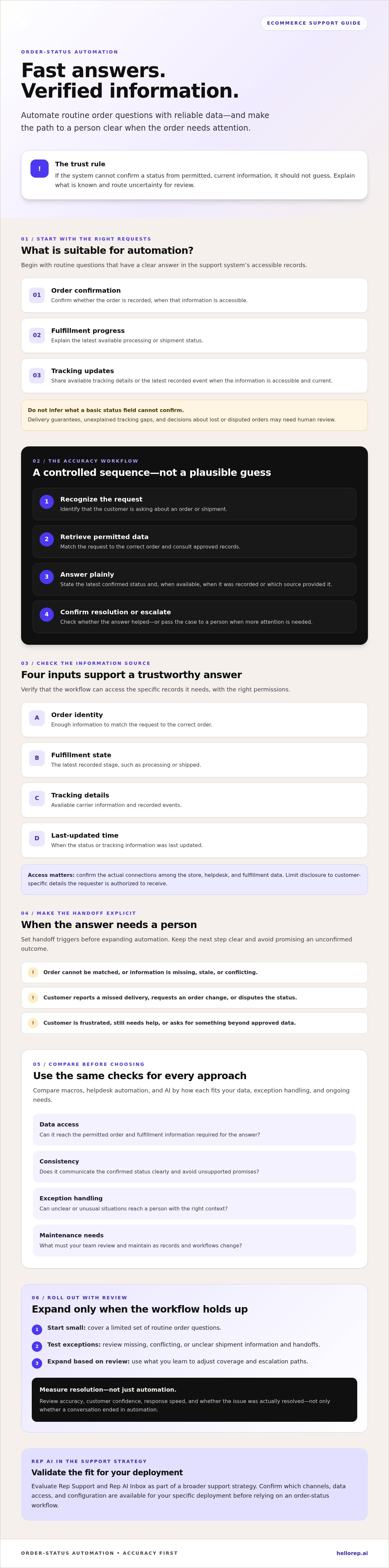
Start with straightforward requests that have a clear answer in the information available to the support system:
Order confirmation
Confirm whether an order is recorded, when that information is accessible.
Fulfillment progress
Explain the latest available processing or shipment status.
Tracking updates
Share tracking details or the latest recorded event when those details are accessible and current.
Each response depends on having the right data and permission to use it. Delivery guarantees, unexplained gaps in tracking, and decisions about lost or disputed orders should not be inferred from a basic status field. Route those cases for human review unless the relevant outcome is verified and authorized.
Where automation helps, and where it should hand off
AI to automate order status inquiries can provide prompt answers to routine questions and reduce repeated work for support teams. That doesn’t mean every conversation disappears from the queue. A customer reporting a missed delivery, requesting an order change, or disputing a status may need investigation and judgment, not another automated update.
Set clear handoff triggers for missing or conflicting data, unusual order circumstances, and signs that a customer is frustrated or still needs help. The response should explain what is known, avoid promising an outcome that hasn’t been confirmed, and make the next step clear. Measure success by accuracy and customer confidence as well as response speed.
For a broader view of support automation, explore Rep AI support capabilities. An order lookup workflow still depends on confirming the data access and channel configuration available for the specific deployment.
How does AI automate order status inquiries accurately?
Reliable automation depends on a controlled sequence, not on generating a plausible answer. The system must recognize the customer’s request, consult permitted and current information, communicate only what that information confirms, then check whether the issue is resolved or needs human attention.
Verified order data is the foundation of trustworthy automation: if the system can’t confirm a status, it shouldn’t guess. This matters when shipment events update at different times or records disagree.
What data and system access does an order-status workflow need?
Before enabling automated replies, check whether the workflow can access the specific records it needs:
Order identity
enough information to match the customer’s request to the correct order.
Fulfillment state
the latest recorded stage, such as processing or shipped.
Tracking updates
available carrier details and recorded events.
Timestamp
when the status or tracking information was last updated.
Confirm the actual connections among the store, helpdesk, and fulfillment data before making capability claims. An AI system can only answer from information and permissions available to it. Access controls should also limit disclosure to customer-specific details the requester is authorized to receive.
How should the AI answer or escalate a status question?
Use a consistent workflow for AI to automate order status inquiries:
Recognize intent
identify that the customer is asking about an order or shipment.
Retrieve permitted data
match the request to an order and check the approved records.
Answer clearly
state the latest confirmed status and, where available, when it was recorded or which source provided it.
Confirm or escalate
check whether the answer addresses the question, or pass the case to a person.
An unmatched order, conflicting events, stale information, or a request beyond approved data should trigger a safe handoff. Don’t turn uncertainty into a delivery estimate or promise. If a customer expresses frustration, make the transition to human support clear and carry over the question, relevant conversation details, and information already checked so the customer doesn’t have to start again.
For teams evaluating Rep AI, verify order-data access and deployment details before assuming a specific integration is available. A Rep AI demo can help frame those questions around your support workflow.
Compare order status automation approaches before choosing a solution
The right setup depends on your support stack, the quality of your order data, the channels customers use, and how often status questions arrive. A fixed rule can handle a predictable request well. A more flexible system may help when a customer combines a tracking question with another concern. No approach can provide reliable updates without access to relevant, current information.
Use these criteria to compare the options:
Rules-based macros
Use a prewritten response after a specific trigger. Data access is usually limited to configured fields or conditions. Wording stays consistent, but exceptions need extra rules. Maintenance grows as conditions and templates multiply.
Helpdesk automation
Apply routing, tagging, and response rules within support workflows. Data access depends on connected systems and configuration. It can standardize routine handling, while unusual cases may need carefully designed routing and ongoing workflow upkeep.
AI support
Interpret varied phrasing and, where permitted data is connected, generate a contextual answer. Response consistency depends on grounding and controls. It can handle more varied requests, but must hand off when information is missing or uncertain and needs review to maintain quality.
These are general patterns, not guarantees about every tool. A reactive helpdesk typically starts with an incoming ticket and organizes the response. Some AI solutions also respond to incoming questions; others may support more proactive sales and support. Assess the actual product rather than assuming every AI system behaves alike.
When are rules or helpdesk workflows enough?
Fixed templates and explicit routing rules can be a strong fit for narrow questions with dependable answers, such as confirming a recorded fulfillment status. They become less effective when a customer asks about a delay and requests an order change in the same conversation. For relevant product context, review Rep AI Inbox and its ecommerce helpdesk workflows.
What should an AI support platform prove before adoption?
Ask for a demonstration using realistic cases: a clear tracking update, missing data, conflicting events, and a request outside approved information. Check whether answers stay grounded and whether context reaches a person during handoff. Confirm channel availability for your deployment, then test each channel your customers use. Don’t assume support works identically across web chat, email, and social messaging.
Choose based on readiness, not novelty. If order records are incomplete, improve access and data quality before expanding automation. If volume is manageable and questions are highly repetitive, rules may be sufficient. If inquiries vary and the data is ready, AI-powered order-status automation may be worth testing against clear accuracy, escalation, and customer-experience measures.
How to implement order status automation without risking customer trust
Roll out automation as a controlled support workflow, not a blanket switch. Begin by mapping the status questions customers ask. Then confirm which order, fulfillment, and tracking fields the system can access and how current those records are. Configure responses only for information the system can verify. Keep uncertain or exceptional cases with a person.
Start with a bounded set of routine requests, such as checking a recorded fulfillment stage or viewing an available tracking update. Write concise responses that state what is confirmed and avoid promises about delivery or resolution that the data doesn’t support. Review real conversations before expanding to additional intents. This staged approach helps teams find gaps while the scope is still manageable.
What should teams test before launch?
Test representative cases before customers rely on the workflow. Include an order with confirmed shipment, one still awaiting fulfillment, unavailable tracking, and conflicting information. Check that the system responds accurately when data is incomplete, explains its limits, and routes the customer to a person when needed. Verify that the handoff preserves conversation context, so the customer doesn’t have to repeat the issue.
Assign clear owners for data quality, escalation review, and response updates. When fulfillment processes or tracking sources change, these owners can confirm whether existing answers remain accurate and adjust the workflow before stale guidance reaches customers.
Which metrics reveal whether automation is working?
Track quality and customer outcomes together. Define a resolution as an inquiry answered accurately without the customer needing to contact support again about the same issue. Then review:
Answer accuracy
Does the response match the verified order information?
Resolution rate
Was the customer’s question actually settled, rather than merely contained?
Handoff quality
Did the right cases reach a person with useful context?
Repeat contacts and feedback
Are customers returning or signaling that answers were unclear or incomplete?
Don’t count a conversation as successful just because it ended in automation. A deflected ticket can still represent an unresolved customer need. Review failures and repeat contacts regularly, then refine eligible intents and escalation rules. For a practical review of your support workflow, book a demo to assess your support workflow.
Where Rep AI fits into an order-status support strategy
Rep AI is The AI Operating System for Brands, with Rep Support and Rep AI Inbox among its offerings. These products can be evaluated as part of a broader support strategy, including how routine order questions are handled and how exceptions reach a person. That’s a workflow-fit discussion, not a claim that Rep AI automatically retrieves order or fulfillment data. Confirm the connections and capabilities required for your specific implementation.
Channel fit matters too. Rep AI supports website chat, email, Facebook, Instagram, and WhatsApp, but availability can depend on deployment. Map where customers ask order questions, then verify which channels are supported for your setup rather than assuming every capability is available everywhere. Explore AI support capabilities and support data insights as part of that assessment. Confirm separately whether the data you need, including order records, is accessible.
How to assess Rep AI for order status workflows
Bring real customer questions to an evaluation: a routine status check, missing tracking information, a delayed shipment, and a case that needs a person. Ask how each would be handled, what data sources and permissions are required, and what the escalation path looks like. Check channel availability and implementation scope before making assumptions about order lookup or fulfillment connections. A clear AI customer service strategy should also define which cases are safe to automate and which should stay with your team.
What a useful evaluation should leave you knowing
A productive assessment should end with specific answers, not broad promises. Document which order inquiries can be handled with the data and permissions available, which require human review, and how customers move between automated support and a person. Agree on how your team will review answer accuracy, handoff quality, repeat contacts, and customer feedback after launch.
The goal is to determine whether Rep AI fits your actual workflow, channels, and data environment. It isn’t a promise of unverified order-status functionality. If you’re considering AI to automate order status inquiries, book a Rep AI demo to assess the workflow, confirm what needs verification, and identify the right next steps.
Build order support customers can rely on
Effective order automation starts with verified information, not a confident guess. Match the approach to your data readiness and support needs, then automate a defined set of routine questions while keeping a clear path to human help for exceptions. Judge results by answer accuracy, completed resolutions, handoff quality, and whether customers need to ask again.
That’s the standard to apply when evaluating AI to automate order status inquiries. Rep AI brings sales and support capabilities together in The AI Operating System for Brands. Its Website Concierge uses a Rescue algorithm that reads 500+ behavioral signals, a capability positioned within a broader customer experience, not as a claim of order lookup access. Confirm the data connections and workflow fit your use case requires.
Ready to assess how your current support workflow could handle routine status questions and exceptions? Book a demo to assess your support workflow. With the right data, boundaries, and escalation plan, your team can make routine updates easier to manage while preserving customer trust.
Frequently Asked Questions
Can AI automatically answer Where Is My Order questions?
Yes, if the system can access current, permitted order and fulfillment information. It can then answer routine questions, such as whether an order has shipped or whether tracking updates are available. Automation should cover only statuses supported by verified data. If an order can’t be matched, information is stale, or details conflict, the system should explain the limitation and route the inquiry for human review.
What data does AI need to answer order status inquiries accurately?
An order-status workflow typically needs a way to identify the correct order, its current fulfillment state, available tracking events, and when those details were last updated. It also needs appropriate access controls so it reveals only customer-specific information the requester is permitted to see. Confirm which store, helpdesk, and fulfillment records are connected before assuming an AI system can retrieve or share them.
How do you prevent AI from giving customers incorrect tracking updates?
Ground responses in current, verified records and define what the system can say when information is missing or inconsistent. Test cases with unavailable tracking, delayed updates, and conflicting events. The AI should never fill gaps with a guessed delivery date or unsupported promise. Set a clear handoff path for uncertain cases, then review answer accuracy and customer feedback to catch problems and improve the workflow.
When should an automated order status inquiry be handed to a human?
Escalate when the system can’t match an order, records conflict, or a customer’s request falls outside approved information. A person should also review cases that require investigation or judgment, such as disputed order details or a reported delivery problem. Pass the conversation context and information already checked to the support team. This helps the customer continue without repeating the full issue.
Can order status automation work across website chat, email, and social messaging?
It can, provided the chosen support solution supports those channels and the workflow is configured for each one. Rep AI’s available channels include website chat, email, Facebook, Instagram, and WhatsApp, with availability depending on the specific deployment. Verify channel coverage, data access, and escalation behavior separately. Don’t assume an order-status workflow that works in one channel is automatically available or configured the same way across others.
How do you measure whether order inquiry automation is working?
Measure more than how many conversations end without a person. Track whether answers match verified order information, whether customers’ inquiries are genuinely resolved, and whether handoffs reach the right person with useful context. Monitor repeat contacts about the same order and review customer feedback for signs of confusion. A conversation that ends in automation but leaves the customer’s question unanswered isn’t a successful resolution.
Does Rep AI automatically look up order tracking information?
Rep AI’s order-data access and tracking lookup capabilities aren’t confirmed here, so don’t assume automatic order lookup is available. Rep Support and Rep AI Inbox are relevant products to assess for support workflows, but a specific order or fulfillment connection must be verified for the intended deployment. Confirm the required data sources, access permissions, channel availability, and escalation process before relying on automated tracking answers.
More from REP AI

Adobe Commerce AI Support Integration: What to Evaluate in 2026
Can an Adobe Commerce AI support integration connect to your store without disrupting customer context or existing support workflows? Answer that before comparing features. A platform’s general integration claims don’t prove compatibility with your specific Adobe Commerce setup. Adobe Commerce offer...

Automated Sales Assistant: 2026 Agentic Selling Guide
Over 97% of website traffic leaves without buying, clicking, or interacting. Customer acquisition costs keep climbing, yet on-site conversion rates remain stubbornly flat. Most brands try to bridge this gap with reactive chatbots, only to watch them sit idle in the corner of the screen. An automated...

AI for Handling Returns and Exchanges: Convert Lost Sales into Retained Revenue
Processing an online return costs between $10 and $65 per item, turning standard refund requests into an immediate margin killer. With ecommerce return rates hovering around 20%, treating reverse logistics as a routine helpdesk task bleeds gross revenue. Deploying AI for handling returns and exchang...
Want to see what your store would do with Rep?
Run your real Shopify catalog through the simulator before you commit to anything. No sales call required.

