


How to see and export chat consent records in REP AI
When you use Require consent before chat, REP AI records whether each shopper accepted or declined, with the time and the wording they saw, and admins can export the log as a CSV. Open the consent entry in a conversation for a read-only view, or export a date range with one row per response and a column saying whether the wording could be confirmed.
Chapters
Transcript
A response with a record
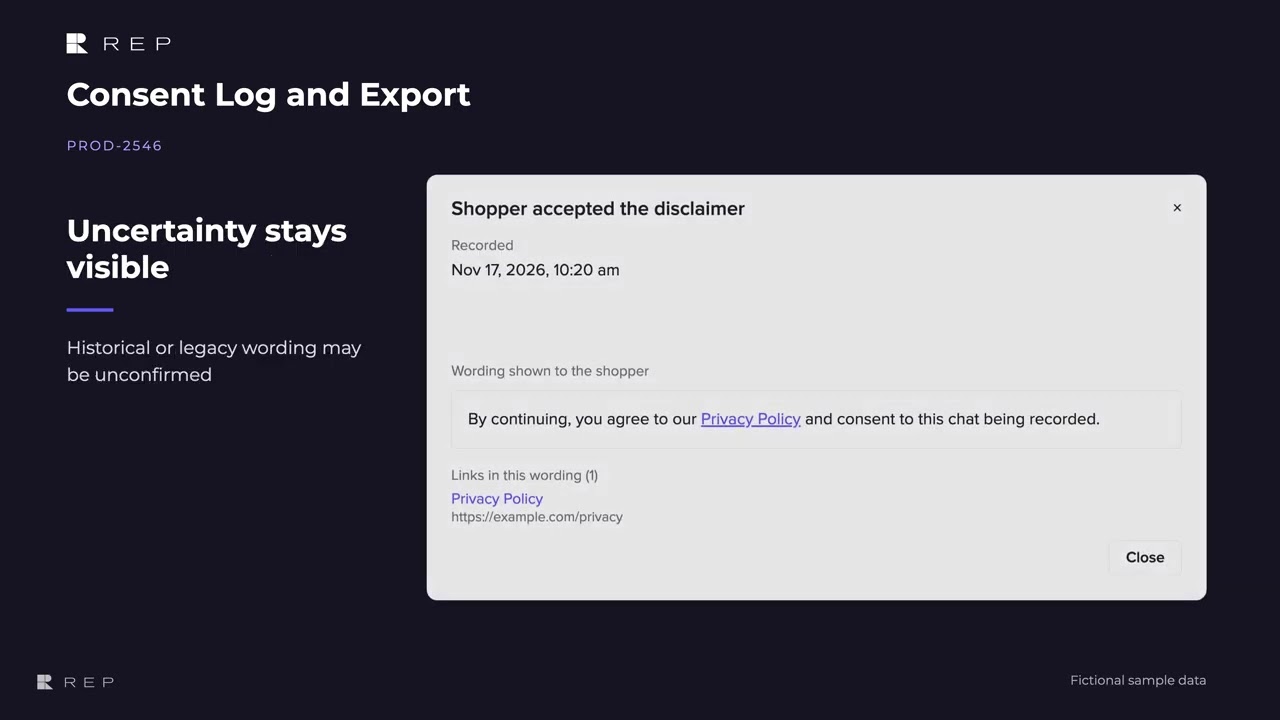
When consent is required before chat, the conversation can show whether the shopper accepted or declined along with the recorded time. The consent entry opens a read-only view of the wording recorded for that response, including
Inspect the recorded wording
the destination of each link.
Uncertainty stays visible
If the exact wording could not be confirmed, the record says so, keeping that uncertainty visible to your team.
Export a date range
Admins can export the consent log for a date range, with one row per response and a column for wording confirmation.
Common questions
Can I export shoppers' chat consent from REP AI?
Yes. Admins can export the consent log as a CSV for a date range, with one row per accept or decline and a column saying whether the wording could be confirmed.
Does the consent log cover the footer notice?
No. It covers Require consent before chat, not a footer notice.
Will every older record show the exact wording?
Not always. Historical or legacy records may have unconfirmed wording, and the record says so.
See it working on your own store.

