


How REP AI lets shoppers pick a subscription plan in chat on Shopify
When a shopper starts a new subscription, REP AI shows the store's plans together in chat, each with its delivery schedule and price, and adds the chosen plan to the Shopify cart. It works in web chat on Shopify with the subscription plans you already have, and it starts a new subscription rather than changing an existing one.
Chapters
Transcript
Compare plans in chat
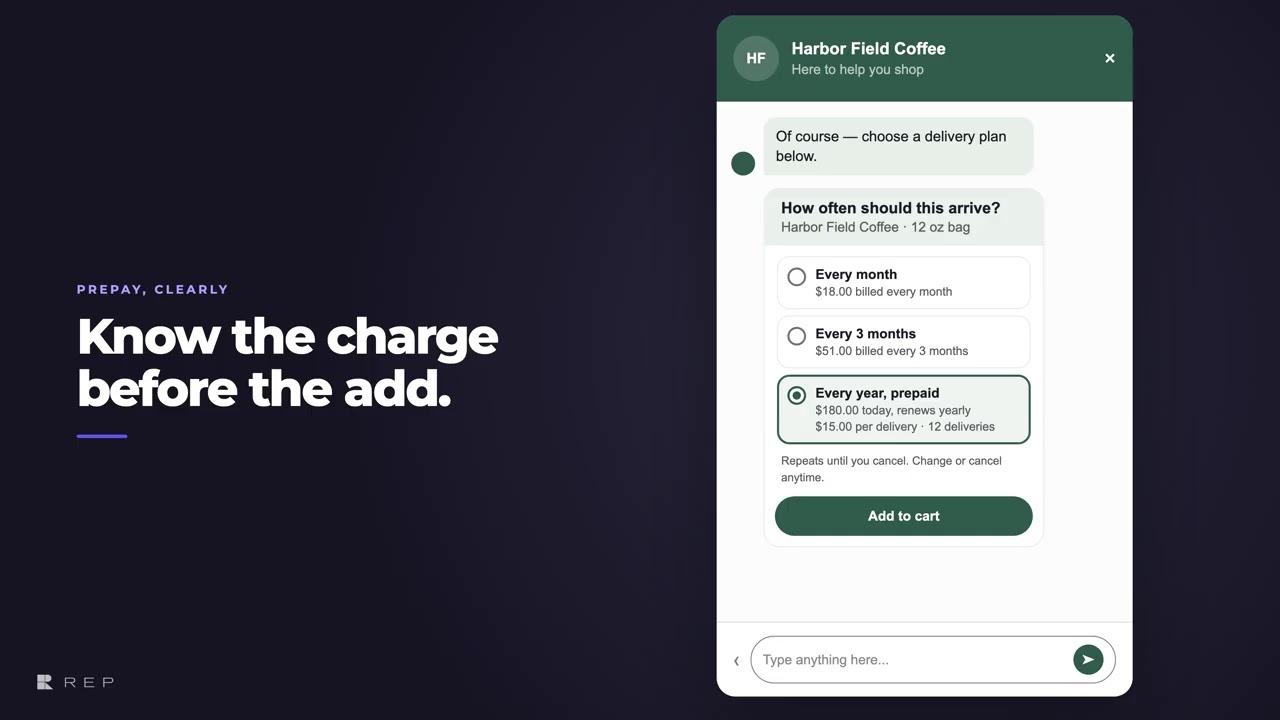
When a shopper starts a new subscription, the store's plans appear together in chat with each delivery schedule and its price.
Know the charge first
A prepaid option leads with the amount due today, while the per delivery figure makes the commitment clear before anything reaches the cart.
Plan confirmed in the cart
The chosen plan is sent with the Shopify cart line, and REP confirms the repeating schedule only after the cart accepts it. That same annual plan is what the shopper finds in the cart, so this is a new purchase with the schedule they selected.
Common questions
Can shoppers choose a subscription plan inside the REP AI chat?
Yes. When a shopper adds a subscription product with two or more plans, the chat shows each plan with its schedule and price, and the chosen plan goes into the Shopify cart.
How are prepaid subscription plans shown in chat?
A prepaid plan leads with the amount due today and also shows what each delivery costs, so the shopper sees the commitment before adding it to the cart.
Can REP AI change a shopper's existing subscription with the plan picker?
No. The plan picker starts a new subscription; it doesn't change an existing one.
See it working on your own store.

